As I work with early‑stage teams, I see a pattern: machine learning is changing how we gather feedback. It can summarise interviews, classify patterns, and even suggest questions, yet it hasn't replaced our own thinking. In this piece I’ll share how AI UX research is changing my practice. If you’re a founder, product manager, or design leader, this matters because better user understanding shapes better decisions. While artificial intelligence won’t take away our jobs, it is reshaping how we approach user questions.
What is AI UX research?
At its core AI UX research is about blending artificial intelligence with our regular user research methods. Traditional user experience research draws from design research, human‑computer interaction and usability testing. We run interviews, observe people using our products and map their goals. Machine intelligence adds new helpers. It can convert an hour‑long conversation into a concise digest, cluster feedback into themes and even propose possible solutions.
This doesn’t mean the fundamentals disappear. A research plan, a good discussion guide and empathy remain essential. The difference is where we spend our time. Instead of transcribing interviews for hours, we spend that time on designing better questions and interpreting what the patterns mean for our product. In classic research the analyst reads every observation, tags phrases and writes the report. In an artificial‑intelligence‑powered approach the analyst instructs software to prepare a first pass, then checks the output, adds context and decides what matters.
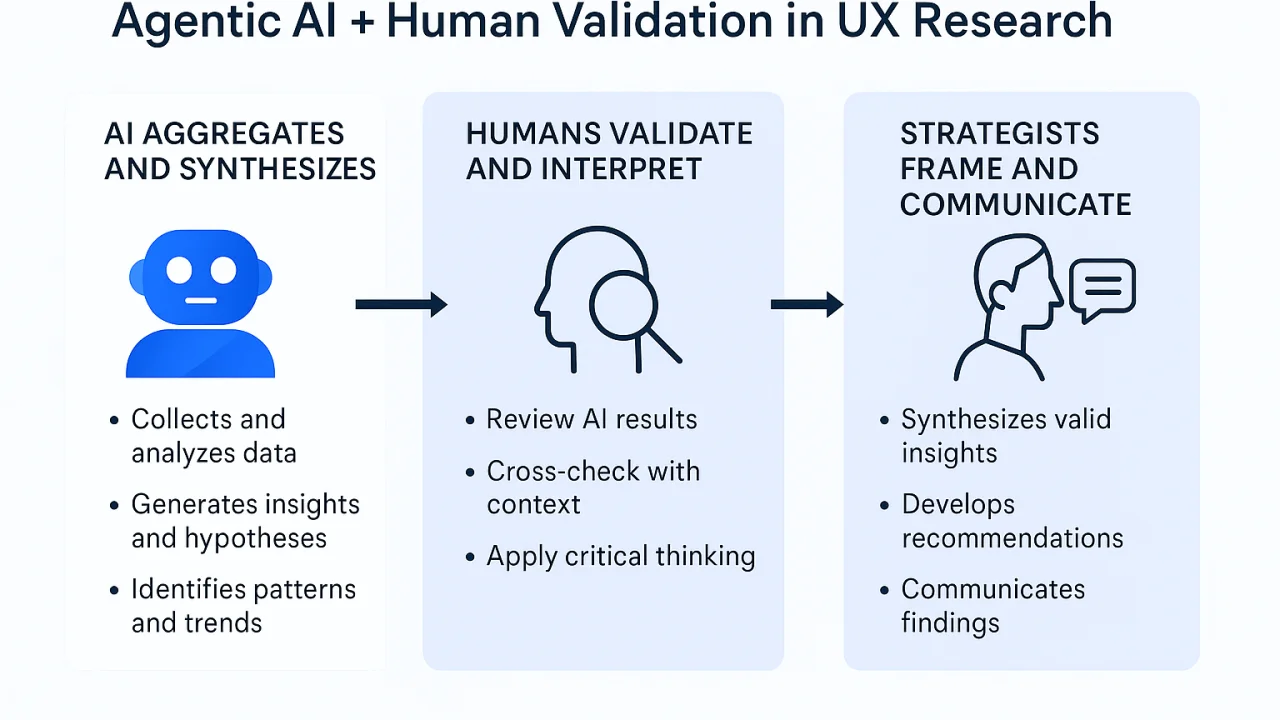
I often describe this work as augmented research: you define the goals, the algorithm helps with the heavy lifting, and you use your judgement to make sense of the output. In short, this practice still relies on human curiosity; it simply uses automation to handle repetitive tasks.
Why artificial intelligence matters in AI UX research
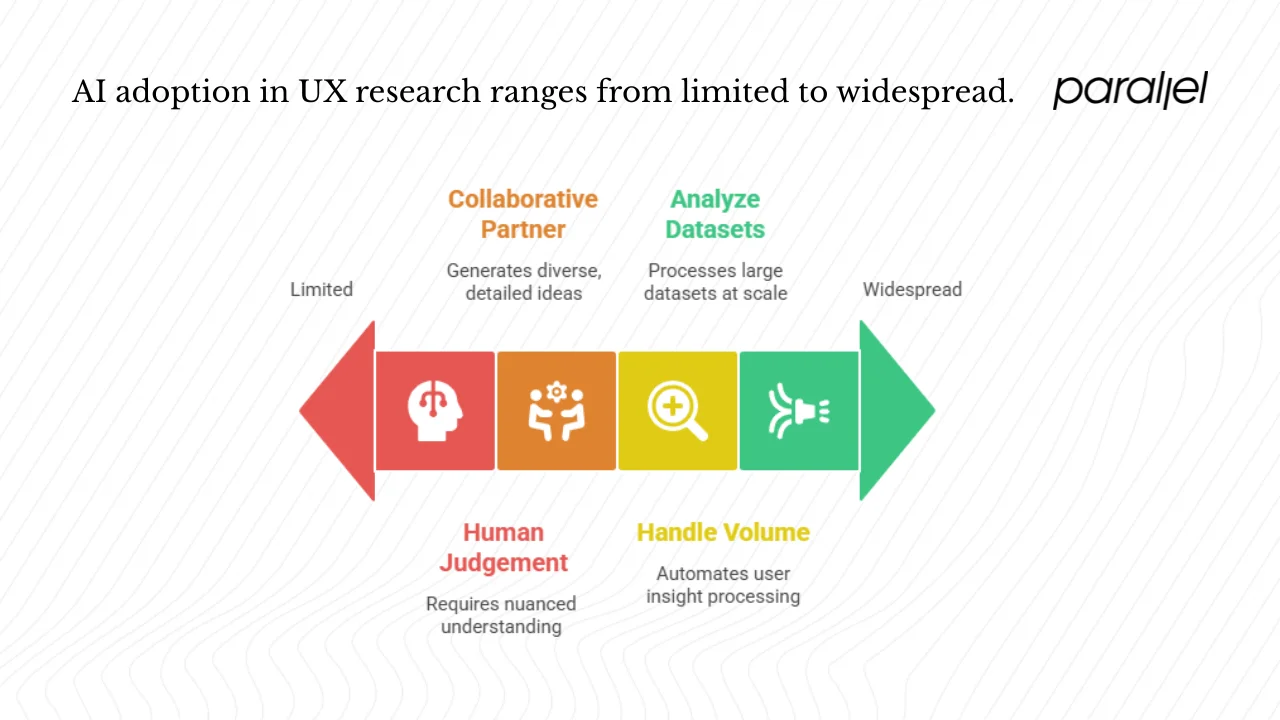
1) Product teams generate more data than ever: Every feature launch produces usage logs, support tickets and survey answers. Founders and managers want to move quickly, yet they also want to avoid costly missteps. Machine intelligence gives us the ability to analyse large datasets at scale. In Maze’s 2025 survey, 58% of product professionals reported using machine learning in their workflows, up from 44% the year before. Those respondents cited improved efficiency and faster research cycles. This aligns with what I’ve seen in our work: teams who adopt automation can process feedback in days rather than weeks.
2) Demand for research is also climbing: A survey summarised by Smashing Magazine found that 62% of respondents experienced an increase in research demand over the previous year. Those same respondents linked research to better outcomes: 85% said it improved usability and 58% saw higher customer satisfaction. When teams respond to these needs, they recognise they can't keep scaling by hiring more researchers. Automation allows a small team to handle a larger volume of user insights.
3) Machine intelligence also fuels innovation: An IDEO experiment with 1,000 business leaders found that leaders who used intelligent prompts generated 56% more ideas, with a 13% increase in diversity of ideas and 27% more detail. The same study showed that businesses using artificial intelligence to drive innovation saw a 38% larger impact on growth. While this study focused on ideation, it illustrates a pattern: when we use machines as collaborative partners, we get more varied and detailed thinking.
4) Adoption is uneven across tasks: Researchers at Nielsen Norman Group analysed one million Claude.ai conversations and discovered that user experience professionals make up less than 0.01% of the US workforce but generate 7.5% of conversations analysed by large language models. In other words, our field is leading the way in adopting artificial intelligence for work. Yet tasks requiring complex analysis or direct human interaction remain largely untouched by automation. This shows why we still need human judgement.
How artificial intelligence is used in UX research
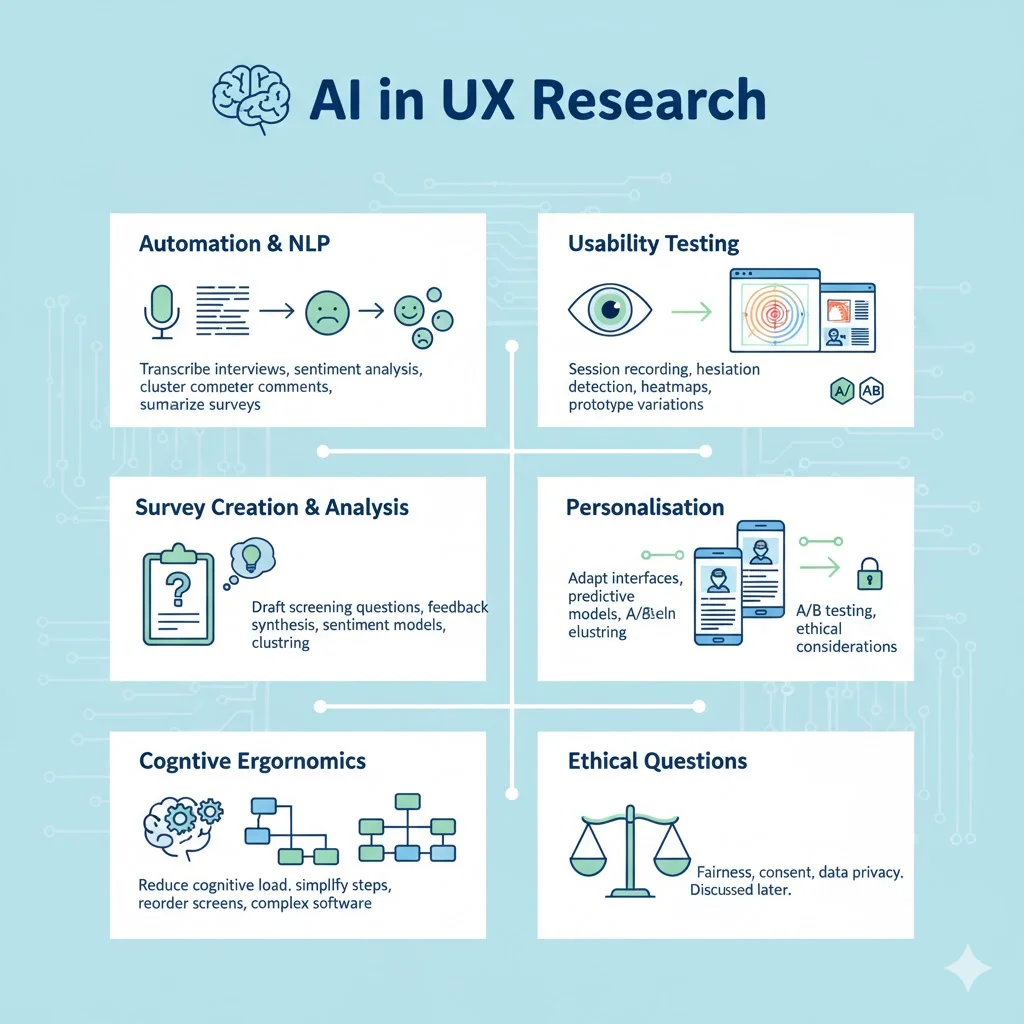
Automation starts with simple tasks. Natural language processing can transcribe interviews and meetings, turning spoken words into text. Sentiment analysis can flag whether feedback skews positive or negative. Clustering algorithms group similar comments so you can see patterns at a glance. I’ve used enterprise versions of language models to summarise open‑ended survey responses; they not only save time but also surface themes I might have missed in a manual pass.
Usability testing also benefits. Some tools record sessions, automatically detect where users hesitate, and compile those moments into clip collections. Others generate heatmaps from click‑tracking data, showing which elements attract attention and which cause confusion. In prototype evaluation, generative models can propose variations of a screen based on your design system, which helps designers think through alternatives quickly.
Surveys can be assembled by machines too. Ask a model to draft a set of screening questions, then refine them with your expertise. This is particularly helpful for teams without dedicated researchers because it reduces the cognitive load of starting from a blank slate. For feedback analysis, sentiment models and clustering techniques provide a starting point for synthesis. They’re not perfect; they often miss sarcasm or cultural subtleties, but they excel at turning hundreds of comments into a digestible set of themes.
Personalisation is another area where artificial intelligence intersects with user experience research. Predictive models can adapt interfaces based on past behaviour, showing different content or layouts to different users. When combined with experimentation, this yields insights into what works for each cohort. It also introduces ethical questions about fairness and consent that we’ll discuss later.
Finally, cognitive ergonomics benefits from automation. By analysing task flows and user inputs, algorithms can suggest ways to reduce cognitive load, such as simplifying steps or reordering screens. They can flag when instructions are too complex or when a user’s memory is overtaxed. This is particularly useful in complex enterprise software where small improvements reduce frustration.
Types of machine‑intelligence UX research tools
The ecosystem of tools is growing fast. I group them into four categories based on what they help you do:
- Content generation: Tools like Ando and ChatGPT can draft surveys, interview questions, or even propose interface copy. They take your prompts and produce variations that you can refine.
- Data analysis: Platforms such as Maze’s machine‑assisted analysis features, QoQo and Synthetic Users specialise in analysing user feedback. Maze’s machine intelligence features summarise test results, while QoQo generates personas from behavioural data and Synthetic Users simulates user behaviour.
- Predictive insights: Products like Neurons Predict forecast how users will respond to a design by modelling eye‑tracking or emotional reactions. These tools estimate attention patterns and emotional responses before you test with real users.
- Workflow optimisation: Tools such as Notion’s assistant, Stitch and Recraft handle research logistics. They assist with record‑taking, summarisation, and scheduling, letting you focus on deeper questions.
This categorisation helps you decide where to invest. Are you trying to generate more ideas, process feedback faster, predict responses, or streamline operations? Different tools serve different objectives.
Best AI UX research tools: a practical list
Based on our projects and the current market, here are some tools you can try. This is not a ranking, but a starting point.
- Maze: A remote testing platform with machine‑assisted analysis. It allows you to run unmoderated tests and surveys, then summarises results automatically. Maze’s insights dashboards reduce the effort of synthesis, which is why 46% of product teams in the Maze survey use it.
- QoQo: An assistant that generates personas and synthesises qualitative feedback. It turns raw data into archetypes you can share with your team.
- Synthetic Users: A simulation tool that creates simulated versions of users based on your data. This can be helpful when recruiting participants is hard or you want to test concepts quickly. Use real users to validate its insights.
- Neurons Predict: A predictive eye‑tracking platform that estimates where users will look on a screen. It can forecast attention patterns before you build a prototype, which speeds up iteration.
- UXPin Merge: A tool that bridges design and code. It uses design tokens to generate production‑ready components from Figma or Sketch files. This reduces handover friction and ensures consistency.
- ChatGPT and Notion’s assistant: While the abbreviation is forbidden in our writing, these tools are widely used. They assist with writing interview scripts, summarising notes, and brainstorming. Use them as a creative partner but always review their output.
- Ando and Stitch: These tools draft survey questions, compile insights, and help with recruitment logistics.
- Recraft: A creative assistant for generating visuals and charts from research data. It helps you present findings clearly without spending hours on presentation software.
Each tool has strengths and trade‑offs. Try a few, see what fits your workflow, and combine them with human judgement.
Benefits of Artificial Intelligence in UX Research
1. Speed and Efficiency
- Machines can transcribe and summarise interviews quickly, saving hours for deeper analysis.
- According to Maze, 58% of product professionals use machine learning, and 57% report faster research cycles.
- These time savings are valuable when quick decisions are needed.
2. Accuracy and Consistency
- Computers are consistent and tireless—they don’t forget to tag comments or skip insights.
- With a structured discussion guide, automated analysis reduces the risk of missing themes.
- The Smashing Magazine concise digest of the Future of User Research report states that:
- 85% of respondents said research improved usability.
- 58% saw higher customer satisfaction.
- 44% reported better engagement.
- 85% of respondents said research improved usability.
- While these results aren’t only from automation, machine intelligence supports them by enabling more frequent and thorough research.
3. Scalability
- Automation helps process large datasets without needing to expand research teams.
- This benefits founders and product managers who need insights but lack dedicated researchers.
- Cross-language testing also becomes possible, as language models can translate feedback and interviews, allowing teams to learn from global audiences.
4. Democratization of Research
- Machine intelligence allows non-researchers (designers, product managers, engineers) to run simpler studies independently.
- Maze’s report shows that:
- 70% of designers
- 42% of product managers are now participating in research.
- 70% of designers
- This lets dedicated researchers focus on strategic, complex analysis instead of basic studies.
Limitations and Challenges of AI in UX Research
1. Over-Reliance and Misinterpretation
- Automation isn’t perfect. Language models can hallucinate or misinterpret sarcasm.
- The Nielsen Norman Group points out that AI helps with planning and analysis, but can’t moderate interviews or capture non-verbal cues.
- Using AI as the sole driver risks losing critical context.
2. Lack of Empathy and Human Understanding
- Machines detect sentiment, but they don’t grasp why a user reacts a certain way.
- They cluster data but miss emotional cues like hesitation or fatigue.
- As NN/g explains, tasks requiring direct interaction or deep synthesis still depend on humans.
3. Algorithmic Bias
- Algorithms inherit biases from their training data.
- This can cause errors such as:
- Misclassifying dialects or sarcasm.
- Predicting behaviour based on non-representative training populations.
- Misclassifying dialects or sarcasm.
- Researchers must check and correct for these biases during analysis.
4. Privacy and Consent
- Recording and transcribing conversations for model input requires explicit participant consent.
- Teams must follow company data policies and legal requirements.
- Using private or enterprise AI models reduces risks, but transparency with participants about data use remains essential.
Best practices for using artificial intelligence in UX research
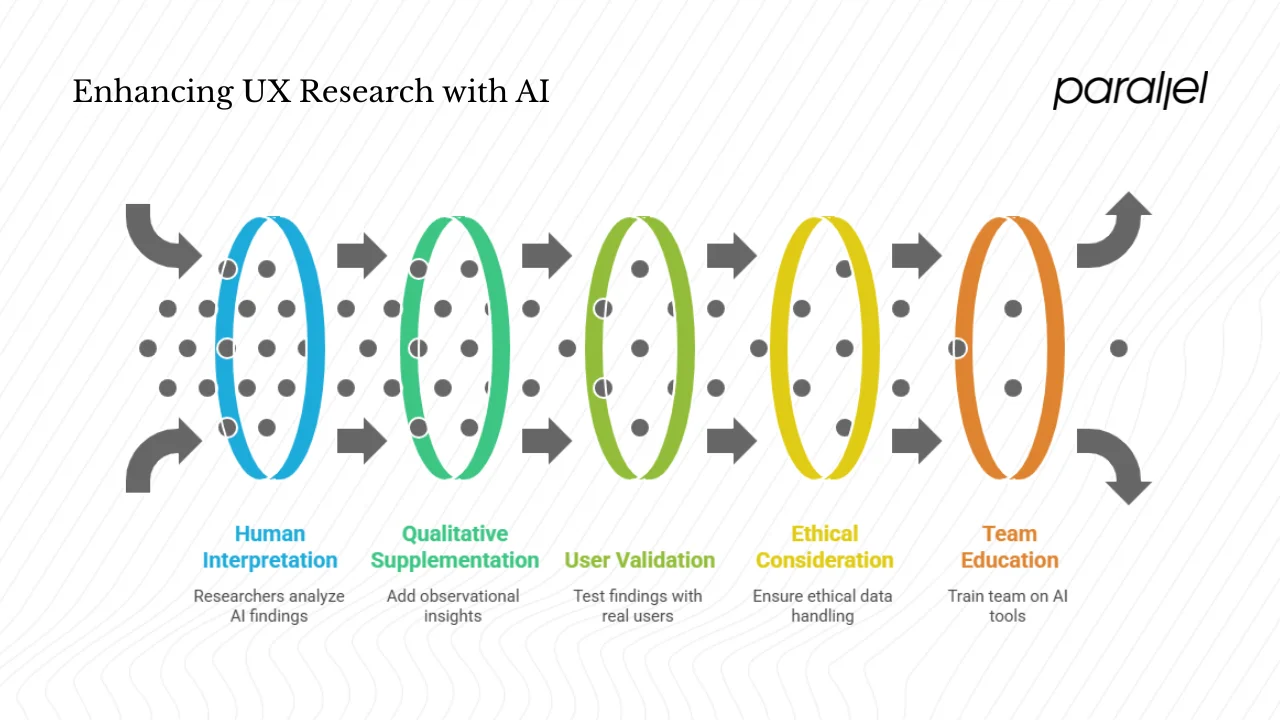
To get the most from automation, I follow a few guiding principles:
- Use machines as assistants, not replacements. Let them handle repetitive tasks like transcription, summarisation and first‑pass clustering. Then bring your own judgement to interpret the findings and shape the narrative.
- Combine quantitative and qualitative insights. Machine‑generated themes are a starting point. Supplement them with what you observed in sessions: body language, tone, and digressions. This combination produces deeper understanding.
- Validate automated findings with real users. If a predictive tool suggests an interface change, test it with actual people. Use rapid, unmoderated tests or quick interviews to check if the suggestion holds up.
- Mind ethics. Always get informed consent when recording or using participant data. Be clear about how you’ll store and analyse it. Ask yourself whether a machine should analyse a sensitive conversation or whether a human should handle it. Check for biases in the model’s training data and watch for hallucinations.
- Educate your team. As more people participate in research, make sure they understand methods and limitations. Provide training or templates so they don’t misuse tools. According to Maze, teams that democratise research are twice as likely to report that it influences strategic decisions.
Following these principles balances the efficiency of machines with the insight of human researchers.
The future of AI UX research
Machine intelligence will continue to become part of our workflow. Predictive design and adaptive interfaces are already on the horizon. Instead of static screens, products will adjust their layout, content and interactions based on individual behaviour in real time. Real‑time feedback loops will allow researchers to see how changes affect behaviour immediately and adjust accordingly. This will blur the line between research and design.
In this future, artificial intelligence will act as a research assistant rather than a researcher. It will watch sessions, surface anomalies and suggest next steps. It might even schedule follow‑up interviews when it detects that a finding needs deeper exploration. But human intuition will remain critical. We will decide which questions matter, interpret ambiguous signals and ensure that our products respect people’s needs.
Adoption will likely grow. The NN/g analysis of Claude conversations shows that user experience professionals already generate 7.5% of conversations analysed by large language models despite representing less than 0.01% of the workforce. This suggests that our field is pushing the limits of what machine intelligence can do. As adoption widens, we must lead the conversation about ethics, quality and human impact.
Conclusion
Automation is reshaping how we work, not replacing us. AI UX research empowers small teams to deliver insights at the pace of product development while freeing researchers to focus on strategic questions. Data from Maze and other sources show that teams using machine intelligence report improved efficiency and customer satisfaction. At the same time, NN/g reminds us that tasks requiring human contact and complex thinking remain firmly in our domain.
For founders and product leaders, artificial intelligence offers a way to scale research without sacrificing depth. The opportunity is to combine machine efficiency with human creativity and judgement. When we do, we not only build better products but also cultivate a deeper understanding of the people we serve. The question isn’t whether machines will take over our field, but how we will use them to ask better questions.
FAQs
1) How is artificial intelligence used in UX research?
We use it to automate manual tasks like transcribing interviews, summarising open‑ended survey responses and grouping feedback. It can generate prototype variations, eye‑tracking predictions, and even draft discussion guides. It’s also used to identify patterns in large datasets and personalise interfaces. However, it always needs human supervision to set the right objectives and interpret the results.
2) Will automation take over user research?
No. Machines handle repetitive tasks and can analyse large datasets quickly, but they lack empathy and contextual understanding. Research requires listening, asking the right questions and interpreting subtle cues. Tools are assistants; they don’t replace the need for human judgment.
3) Can design be done by a machine?
Artificial intelligence can suggest prototypes, propose copy and personalise interfaces based on patterns, but it doesn’t originate vision or strategy. Design is about solving problems creatively. Machines can provide options and data, but they don’t decide which problems to solve or why.
4) Is automation replacing the user experience designer?
No. It is more of a support tool that helps designers and researchers save time, test ideas faster and focus on strategy and creativity. The NN/g study shows that user experience professionals are heavy users of machine intelligence, yet tasks involving human interaction remain outside the scope of automation. Machines amplify our capabilities; they don’t make us obsolete.

check out these related blogs






.avif)