Picture yourself in a small office at 2 a.m. Your demo day is in two weeks, you’re sprinting to get your MVP ready, and every time you look at the task board another ticket slips down. That growing pile of “to‑dos” — features still in design, bugs that just showed up, orders you haven’t shipped — is what people in our world call a backlog. In this guide I’ll answer what does backlog mean and why it matters when you’re leading an early‑stage team.
We’ll cover the basic definitions from dictionaries and finance, how product teams use backlogs to stay focused, the different kinds of backlogs you’ll encounter, ways to keep them healthy, common traps, and practical steps to use your backlog as a tool instead of letting it swamp your company. I’ll also draw on our work at Parallel and insights from recent 2024–2025 reports to ground the discussion in facts and lived experience.
What is a “backlog”?
A backlog is a collection of incomplete work that has accumulated. This can encompass various items, such as sales orders awaiting fulfillment or a substantial volume of financial documents needing processing, like loan applications. In other words, a backlog can represent unfulfilled demand and future revenue.
For manufacturers and SaaS companies, order backlogs indicate whether demand exceeds capacity; a growing backlog may signal strong market interest but can also mean that operations are strained. This business sense is distinct from a simple task list because it quantifies the monetary value tied up in pending orders or contracts.
Backlog in project management and product development
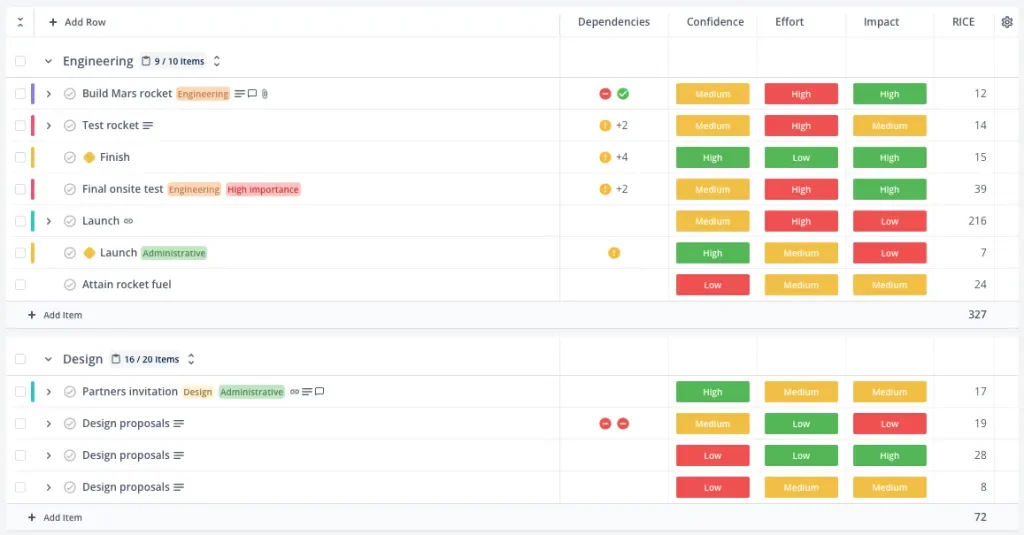
In product and engineering circles a backlog is more than just “stuff left over”; it’s a managed queue. ProductPlan’s glossary describes a backlog as a list of tasks required to support a larger strategic plan, noting that in a product development context it contains a prioritised list of items the team agrees to work on next, including user stories, changes to existing functionality and bug fixes. Atlassian adds that a product backlog is a prioritised list of work for the development team derived from the product roadmap. Crucially, work is pulled from the backlog based on capacity rather than pushed by the product owner. Asana frames a product backlog as an ordered list of tasks, features or items to be completed as part of a larger roadmap. They emphasise that a backlog is essentially a specialised to-do list that helps teams break down projects and determine which tasks are most important. Regular grooming and prioritisation keep the backlog aligned with business goals and sprint planning.
Differences between a backlog and a to‑do list
A to‑do list often captures everything you need to handle today or this week. A backlog, by contrast, is both a repository and a funnel. Items may sit in the backlog for weeks or months, and not all of them will make it into production. Backlogs hold strategic “maybes” alongside ready‑to‑start tasks. They are prioritised, ordered, and continuously refined. ProductPlan notes that a view into the backlog gives technical teams a preview of upcoming work and allows them to think through implementation, dependencies and conflicts ahead of time. This strategic dimension distinguishes a backlog from a simple list of chores.
Why “backlog” matters for startups and product teams
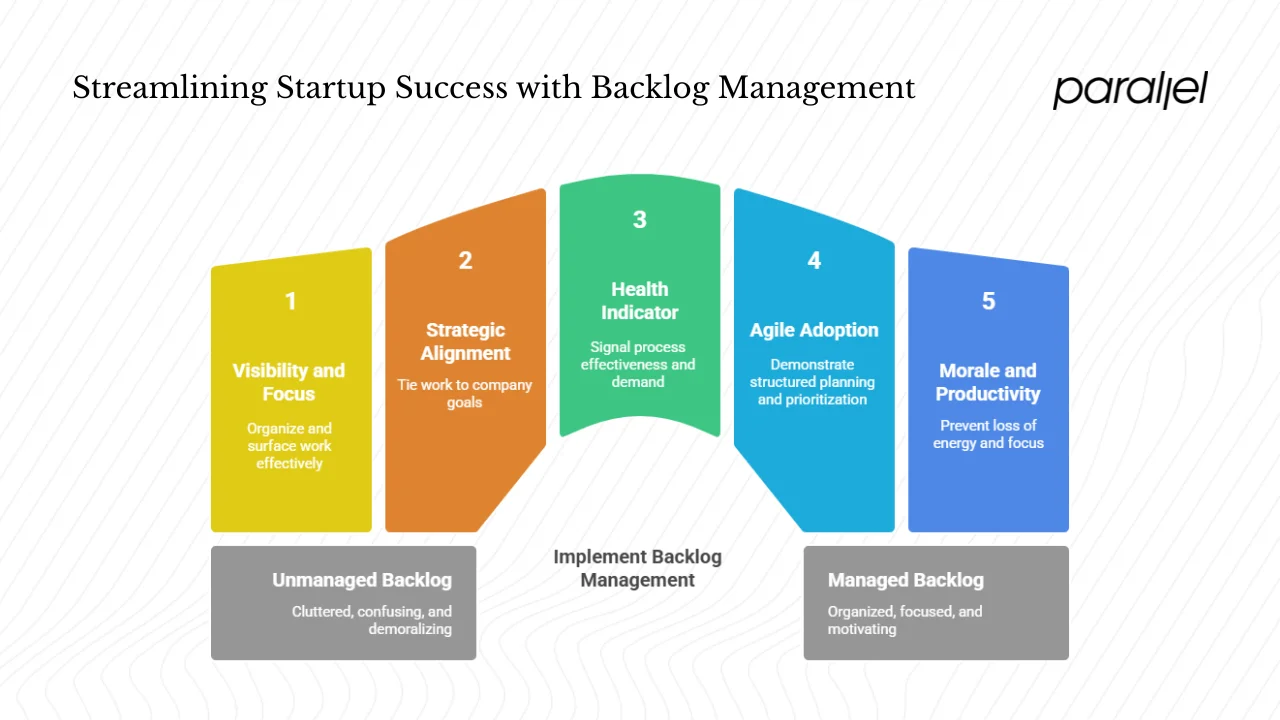
1) Visibility and focus
Early‑stage companies typically juggle more ideas, requests and bugs than they can tackle at once. Without a mechanism to organise and surface this work, teams drown in noise. A structured backlog provides visibility into what lies ahead and helps everyone understand the queue. ProductPlan points out that an accurate backlog allows the team to move swiftly because the team can always see the most important items next. A glimpse into the backlog also helps developers anticipate technical challenges and prepare, reducing surprises and wasted effort.
2) Alignment with strategy
A well‑managed backlog ties day‑to‑day work to the company’s strategic goals. Product managers translate the product vision into a roadmap and then into a backlog of actionable items. Atlassian emphasises that the most important items sit at the top of the backlog so the team knows what to deliver first. By ranking items according to customer needs, business objectives, risk and effort, founders can allocate scarce resources to the highest‑value work. In our practice at Parallel, we’ve seen early‑stage teams boost their momentum simply by trimming their backlog to reflect current priorities rather than historical requests.
3) Health indicator and revenue signal
For product teams, backlog size, age and throughput signal whether your processes are working. In ProductPlan’s 2024 State of Product Management report, backlog items delivered were far down the list of success metrics. This shift toward outcome‑focused metrics means that teams measure success by impact rather than by burning through backlog points. In business operations, a growing order backlog can be a leading indicator of demand; Investopedia notes that a backlog could indicate that a company has insufficient operating capacity or exceptionally high demand. Monitoring backlog size relative to capacity helps founders decide when to hire, pause marketing or streamline processes.
4) Evidence of agile adoption
Backlogs are integral to agile frameworks. According to Parabol’s 2024 agile statistics compilation, 66 % of teams follow Scrum and 81 % of agile teams use some version of Scrum. Scrum and similar methods rely on a product backlog, sprint backlog and continuous refinement. When you hear investors ask “what does backlog mean” in a product context, they’re often checking whether your team uses these practices. A healthy backlog suggests that the team has adopted a structured approach to planning and prioritisation.
5) Preventing morale and productivity loss
Poor backlog management doesn’t just slow delivery; it wears people down. Nimblework’s 2025 article on backlog management warns that backlogs often become “cluttered graveyards” stuffed with old tickets, fuzzy ambitions and competing priorities. The result is scattered focus, stalled delivery and frustrated leadership. The same article notes that overstuffed backlogs hide technical debt and make it hard to distinguish urgent from nice‑to‑have items. Unprioritised items and conflicting priorities lead to endless debates. Aging tickets sap morale and trust. In short, an unmanaged backlog drains energy, blurs decisions and kills momentum. The cost is especially high for early‑stage teams where every day counts.
Key types and dimensions of backlog
Backlogs come in many shapes. Recognising which kind you’re dealing with helps you decide how to manage it.
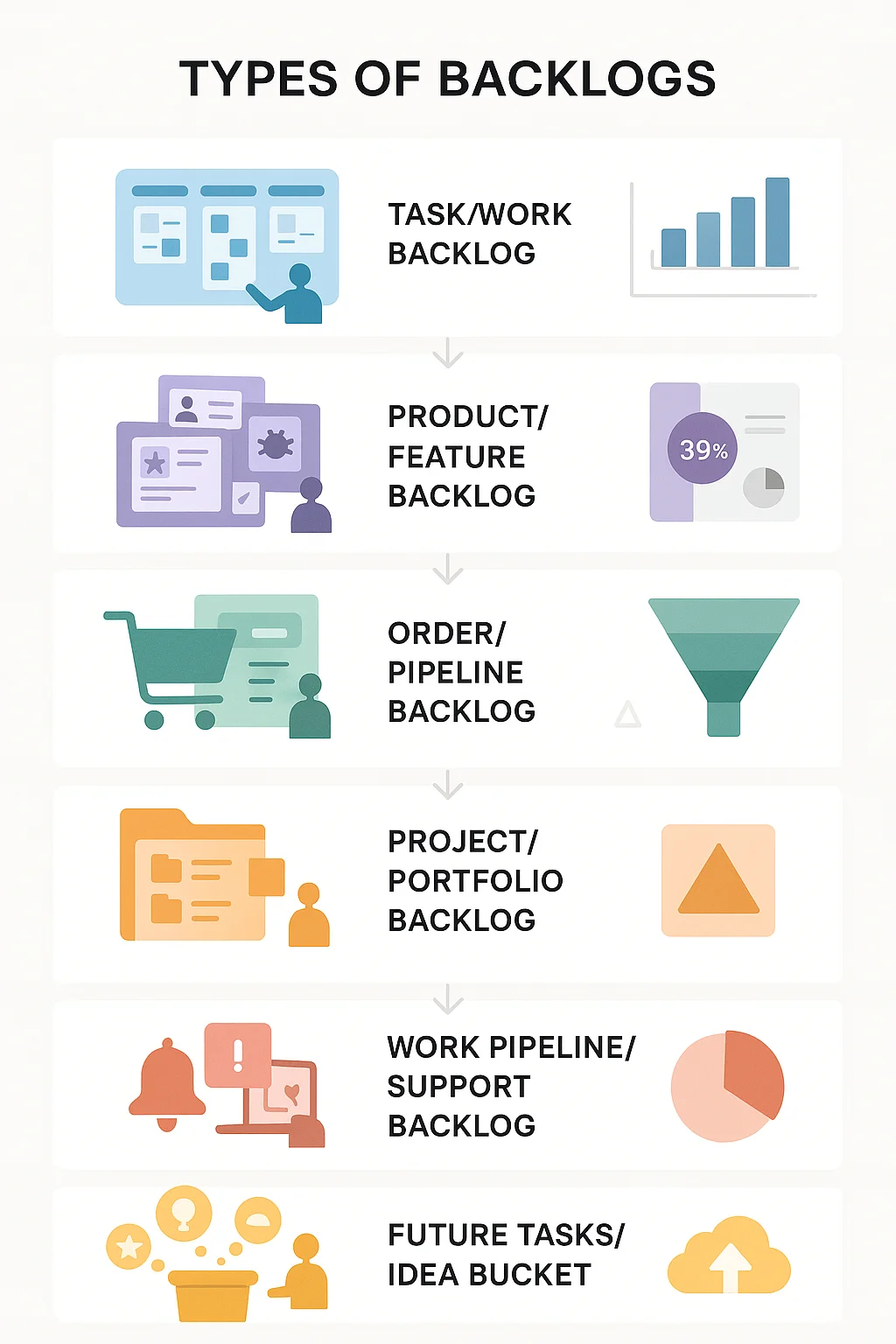
1) Task or work backlog
This is the simplest version: a list of tasks, design work, bugs and enhancements waiting to be done. It is often captured in a tool like Jira or Trello. The Asana glossary calls it an ordered list of tasks or items to be completed as part of a roadmap.
2) Product or feature backlog
Product teams maintain a product backlog that includes user stories, features, bug fixes, technical debt and knowledge‑acquisition tasks. It is the development team’s single source of upcoming work. Sprint backlogs are derived from this list in Scrum.
3) Order or pipeline backlog
In operations and sales, a backlog refers to unfulfilled orders or contracts. Investopedia notes that backlogs can refer to sales orders waiting to be filled. Tracking the value and age of these orders helps leaders manage cash flow and production capacity.
4) Project or portfolio backlog
When a company runs multiple projects at once, leaders may keep a portfolio backlog of initiatives committed to but not yet started or completed. This helps them prioritise across projects and allocate resources accordingly.
5) Work pipeline or unresolved issues backlog
Support teams face backlogs of tickets and unresolved requests. These items often require triage and quick response. Without clear ownership and prioritisation, support backlogs can cause churn and damage customer trust.
6) Future tasks or idea bucket
Many teams maintain a bucket of ideas and research tasks that aren’t ready to start. ProductPlan’s 2024 report observed that 39 % of respondents store user‑research feedback outside their backlog, while 21 % drop it directly into the backlog. Keeping future ideas separate allows you to evaluate them before committing, preventing the backlog from becoming a dumping ground.
How to assess and prioritise a backlog
Checking backlog health
To see whether your backlog is helping or hurting, look at:
- Size: Count the number of items and measure their total estimated effort. A backlog that keeps growing while throughput stays flat is a warning sign.
- Age: How long have items been sitting? Nimblework notes that aging tickets become stale, confusing and demoralising.
- Prioritisation clarity: Are items ranked or is everything of equal importance? Atlassian stresses that the most important items should appear at the top.
- Dependencies and conflicts: Identify items blocked by others. ProductPlan suggests that a view into the backlog helps teams spot conflicts and dependencies early.
- Demand vs. capacity: Compare incoming requests or orders to your team’s ability to deliver. A backlog that consistently grows faster than your capacity signals a structural mismatch.
Prioritisation methods
Prioritising a backlog is part science, part judgement. Common techniques include:
- MoSCoW: Label items as must‑have, should‑have, could‑have, or won’t‑have (at least for now). This forces you to differentiate essentials from nice‑to‑haves.
- Value vs. effort: Score each item by the value it delivers against the effort required. High‑value, low‑effort items rise to the top.
- Risk and urgency: Consider risk (technical or market) and time sensitivity. Some items must be addressed quickly to avoid blockers or missed opportunities.
- Regular grooming: Don’t prioritise once and forget. As Nimblework advises, backlogs need constant care; set a cadence to review and groom your backlog weekly or bi‑weekly.
- Stakeholder input: Soliciting feedback from design, support and customers ensures that the backlog reflects reality and value, not just internal assumptions.
Deciding what to keep and what to drop
Not every item deserves a slot in your backlog. Define “ready” criteria — clear description, acceptance criteria, estimated effort and alignment with goals. If an item is vague or outdated, clarify it or archive it. As Nimblework argues, leaving fuzzy tickets in the backlog wastes effort and erodes morale. ProductPlan’s report recommends storing feedback separate from the backlog so you can decide whether to act on it.
Linking backlog to workflow and capacity
A backlog is only useful if it connects to how your team works. In Scrum, the development team pulls items from the backlog as capacity allows. Kanban teams do the same continuously. For operational backlogs, align production capacity with order inflow; if demand constantly exceeds capacity, you either need to increase capacity or throttle demand. Use the backlog to set expectations for stakeholders: what’s coming up, what’s blocked and when you expect to address key items.
Common pitfalls and how to avoid them
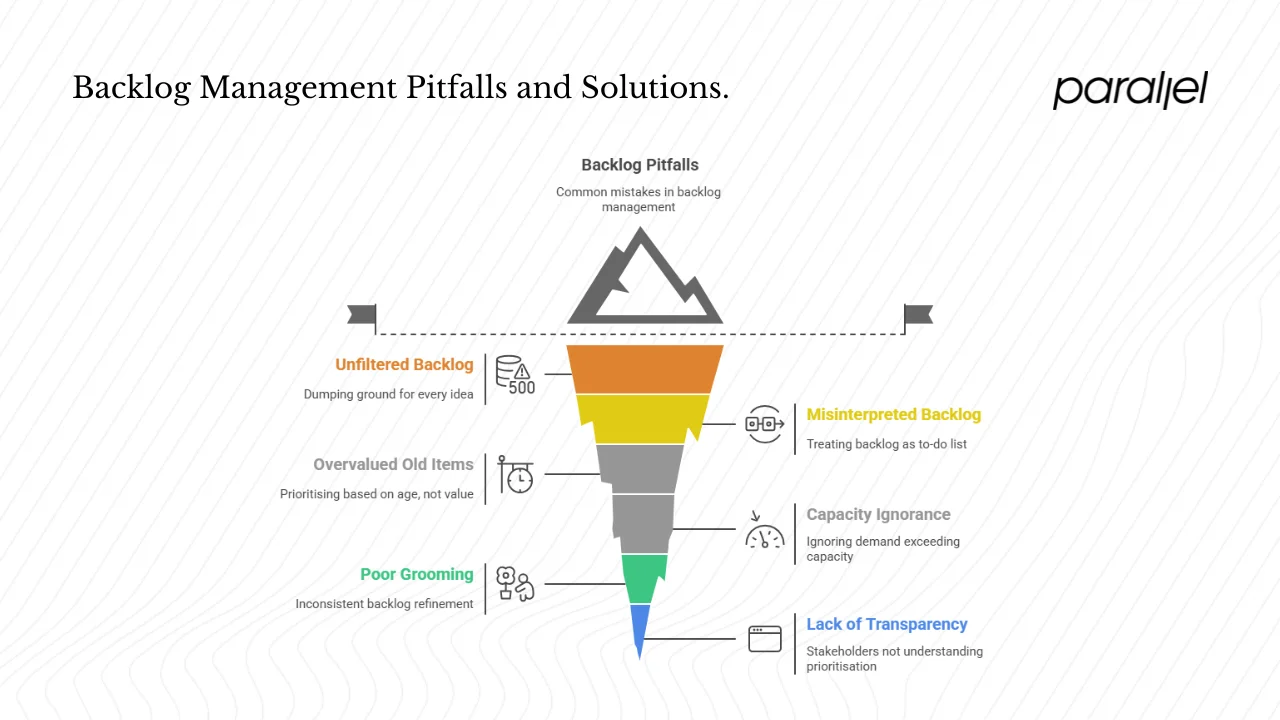
1) Turning the backlog into a dumping ground
When teams dump every idea, request and bug into the backlog without filtering, it balloons uncontrollably. Nimblework describes overstuffed backlogs where technical debt hides alongside shiny new features. Combat this by enforcing intake criteria and using a separate idea or research repository.
2) Treating the backlog like a daily to‑do list
A backlog isn’t what you’ll work on this week; it’s a funnel for future work. Mixing ready‑to‑start tasks with long‑term ideas causes confusion. Keep a clear distinction between the backlog and the sprint or task board.
3) Over‑valuing the oldest items
Just because something has been in the backlog the longest doesn’t make it important. Prioritise based on current value, not age. Regularly archive or revisit stale items to see if they still matter.
4) Ignoring capacity and demand
In business operations, a backlog can signal that demand exceeds capacity. If you ignore this, production delays and customer dissatisfaction follow. Use backlog metrics to decide when to hire, invest in tooling or adjust marketing.
5) Poor grooming and cadence
Backlog grooming isn’t optional. Nimblework warns that inconsistent grooming turns sprint planning into triage sessions filled with unclear tickets. Set a regular cadence for refinement and stick to it.
6) Lack of transparency and stakeholder alignment
If stakeholders don’t see the backlog or understand how items are prioritised, they’ll push their own agendas. Atlassian’s guide notes that without clear prioritisation and communication, conflicting priorities arise and slow delivery. Share the backlog with all relevant teams and explain the criteria used to rank items.
CTA: Book a call
Best practices for managing backlog in startups and product teams
- Make it visible. Use a shared board or tool. The product backlog should be the single source of truth. Hidden backlogs breed confusion.
- Connect to your roadmap. Every backlog item should trace back to a strategic objective. If an item doesn’t support a goal, question why it’s there.
- Separate future ideas from ready tasks. Keep an idea or discovery bucket separate from the backlog. Only promote items into the backlog when they meet ready criteria.
- Set a grooming routine. Establish weekly or bi‑weekly backlog refinement sessions. Come prepared with a checklist: clear description, acceptance criteria, estimate and priority. Remove or split large ambiguous items.
- Use structured prioritisation. Adopt MoSCoW or similar frameworks to rank items. Align priorities with customer needs, company goals and effort estimates.
- Monitor metrics. Track backlog size, age distribution, velocity and ratio of ready vs. waiting items. Monitor order backlog value and fulfillment rate in operational contexts.
- Connect backlog to team capacity. In Scrum, teams pull work as they have bandwidth. In operations, adjust production or marketing based on backlog trends.
- Tie backlog to user research. Link backlog items to research findings so you’re solving real problems. ProductPlan’s survey showed that teams who store feedback separate from the backlog are better able to decide which feedback to act on.
- Clean up regularly. Archive or delete outdated items. Nimblework stresses that cleaning up is not optional because messy backlogs sap productivity and morale.
- Educate stakeholders. Show founders, design leads and engineers how backlog prioritisation works. When everyone understands the process, they’re more likely to support it.
Real‑life examples and scenarios
Scenario A: A product team prioritising user requests
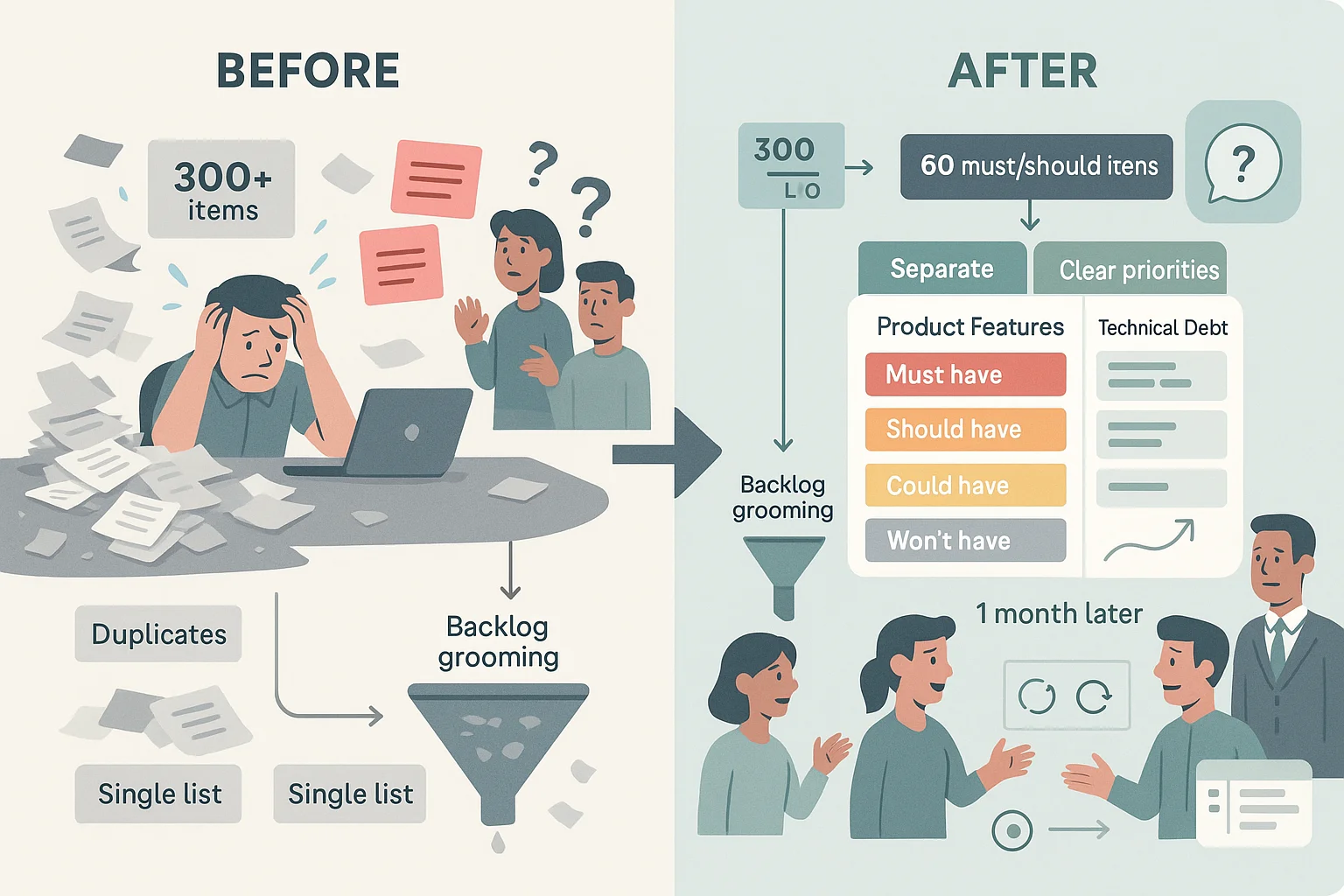
An early‑stage SaaS startup notices that feature requests and bug reports are piling up. Initially the founder kept everything in a single list. The backlog quickly became unwieldy — over 300 items, many duplicates. During backlog grooming they implemented MoSCoW and trimmed the list to 60 must‑have and should‑have items. Technical debt items were pulled into a separate track. Within a month, sprint velocity improved because the team wasn’t context‑switching. They also used ProductPlan’s recommendation: a view into the backlog allowed the engineering team to think ahead about dependencies. When an investor asked them what does backlog mean for their product, they could explain that it’s a living, prioritised queue derived from the roadmap and tied to outcomes.
Scenario B: A manufacturing order backlog
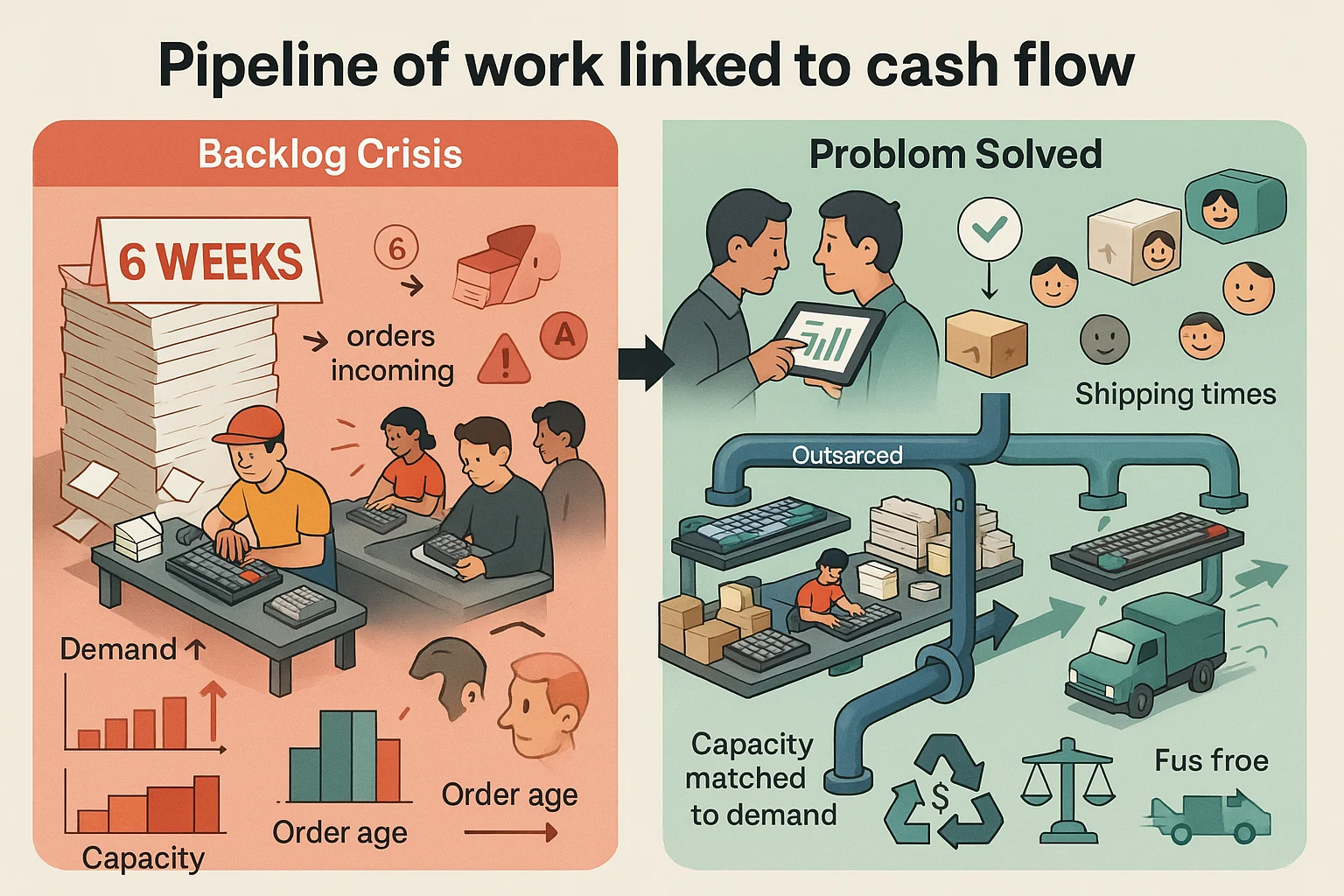
A hardware startup producing custom mechanical keyboards found itself sitting on six weeks of unfulfilled orders. Demand had grown faster than their small production line could handle. This order backlog represented committed revenue but also a risk; customers would churn if delivery times slipped too far. By tracking the value and age of orders and comparing them to manufacturing capacity, the founders decided to outsource part of the assembly. Their backlog shrank and shipping times fell. This illustrates the business meaning of backlog: it’s not a “to‑do list” but a pipeline of work linked to cash flow.
Scenario C: A support backlog hurting retention
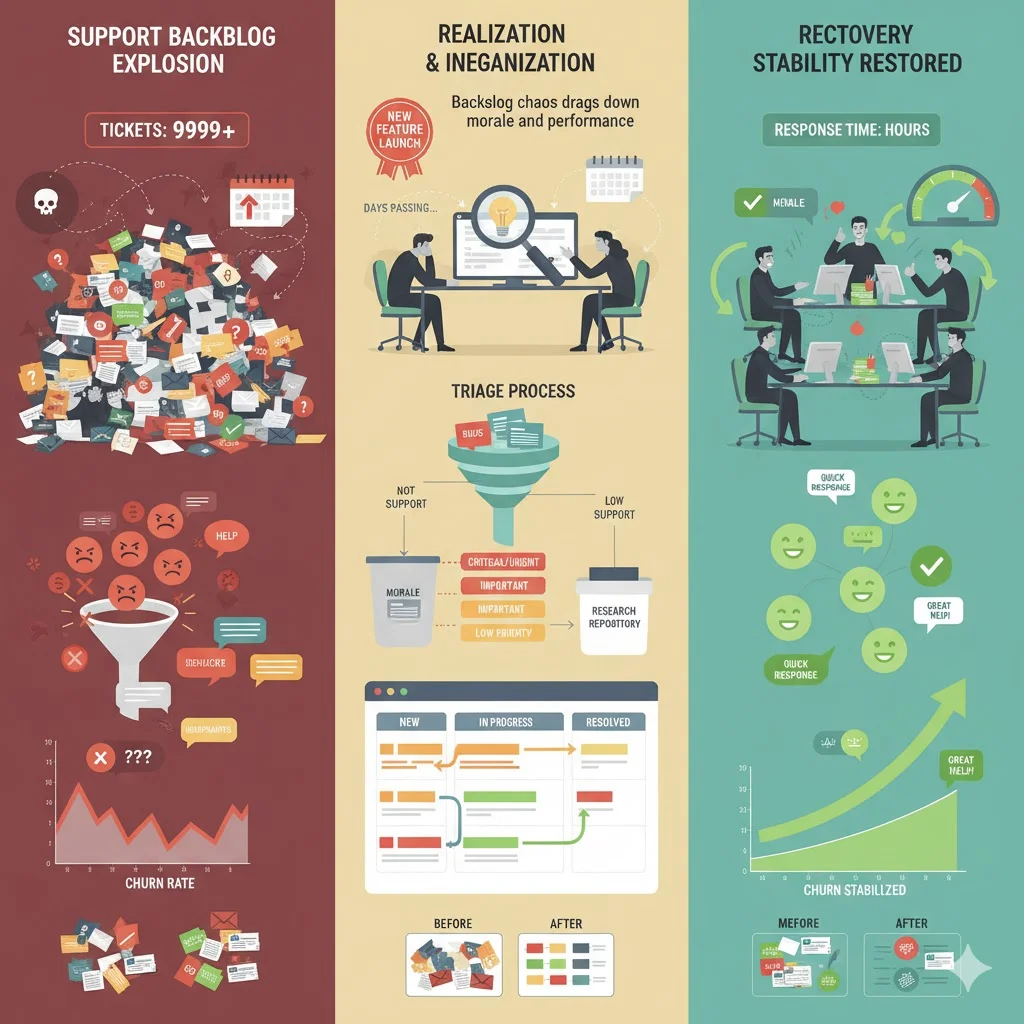
A subscription service’s help desk faced a backlog of unresolved tickets after launching a new feature. The queue grew so large that some tickets sat unanswered for days. Frustrated users began cancelling. The team realised they had treated the backlog as a dumping ground; there were duplicates, low‑priority suggestions and vague bug reports. They created a triage process, moved feature requests into a separate research repository and adopted a Kanban board for support tickets. Their response times improved and churn stabilised. This story echoes Nimblework’s warning that backlog chaos drags down morale and performance.
Scenario D: Consumer “backlogs” in gaming
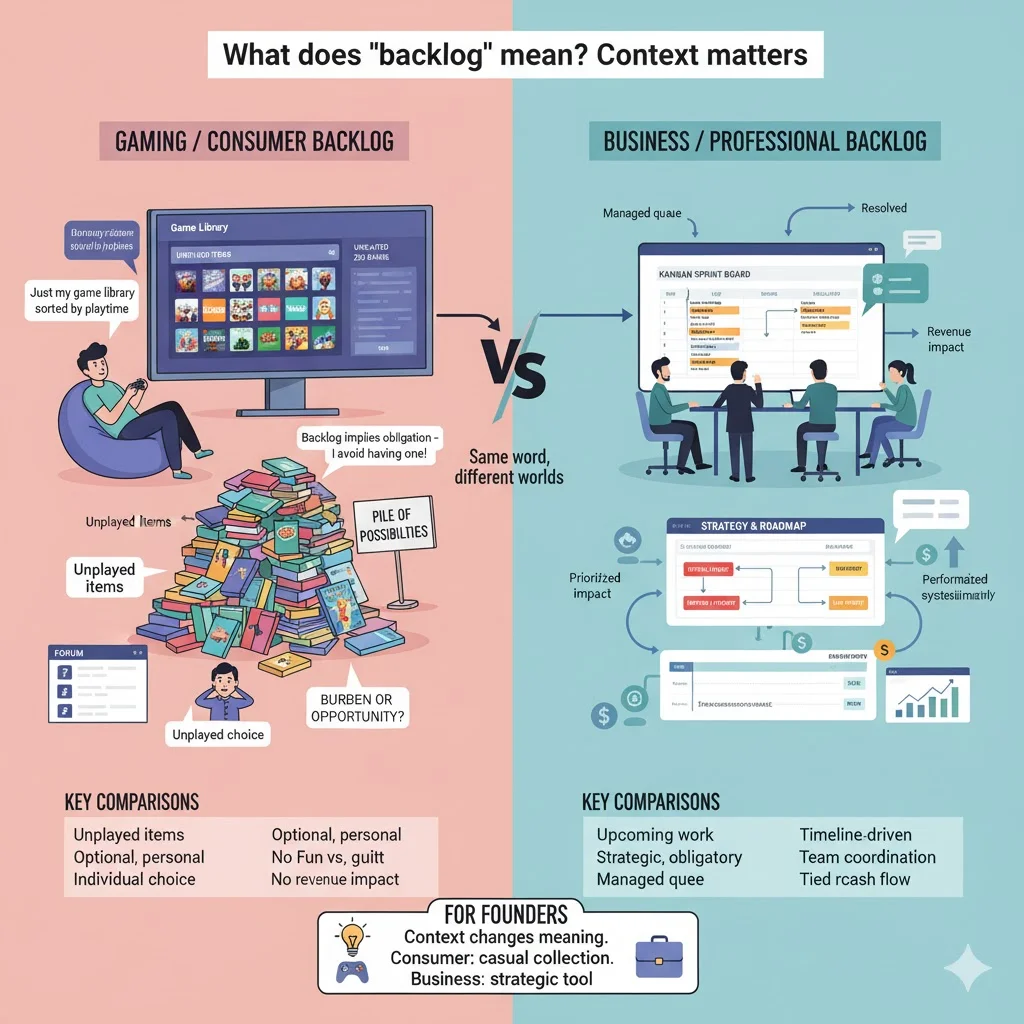
Outside of work, gamers often speak of a backlog as the pile of games they own but haven’t played. On forums people debate whether a backlog is a burden or a collection of possibilities. One user said their backlog is simply their game library sorted by playtime, while another argued that “backlog implies obligation” and therefore they avoid having one. The takeaway for founders is that what does backlog mean depends on context; consumers use it casually to describe unplayed items, whereas in product and business contexts it’s a managed queue tied to strategy and revenue.
When a backlog is a good sign vs. when it’s a red flag
Signs of a healthy backlog
- The backlog is tied to the roadmap and business goals.
- Items are sized, prioritised and regularly groomed.
- Team capacity matches incoming work; the backlog supports a steady sprint flow or order fulfillment.
- The backlog provides transparency; stakeholders know what’s coming and why.
- For product teams, the backlog includes technical debt and research tasks so nothing important is hidden.
Warning signs
- A large number of unprioritised items with no clear ranking or plan.
- Production or delivery bottlenecks causing the backlog to grow faster than capacity.
- Stale items that sit in the backlog for months without clarification.
- The team doesn’t understand what to work on next because the backlog is opaque.
- The backlog is misaligned with strategic goals, meaning resources are spent on low‑impact items.
When you hear what backlog means used as a critique, it often points to one of these warning signs. A backlog filled with unfocused tasks can be a symptom of deeper problems: unclear strategy, poor communication or capacity issues.
Quick checklist for startup founders and product/design leaders
- Do we have a documented backlog (task list, features, projects, unresolved issues)?
- Is the backlog visible and prioritised, and does it map back to company goals?
- Do we review and groom the backlog regularly?
- Are workload and demand in reasonable balance or is our backlog growing unchecked?
- Do we separate ready‑to‑work items from future ideas?
- Are stakeholders aligned on how items enter and move up the backlog?
- Do we track metrics like age of items, number of items and time to resolution?
- In business contexts, do we monitor order backlog value and delivery risk?
As a founder, ask yourself what does backlog mean in your own company. Is it a strategic tool guiding resource allocation, or is it a chaotic list that everyone avoids? Honest answers to these questions will tell you whether your backlog supports growth or hinders it.
Conclusion
Backlog is a simple word with layered meanings. In plain English it’s an accumulation of tasks unperformed; in finance it’s unfulfilled orders waiting to be processed; in product management it’s a structured, prioritised list tied to a roadmapatlassian.com. For early‑stage teams the backlog is both a mirror and a lever — a mirror because it reflects demand, capacity and strategic focus, and a lever because managing it intentionally can accelerate progress.
When someone asks what does backlog mean, they’re probing whether you have a handle on your work pipeline. A healthy backlog is transparent, prioritised and connected to outcomes. A messy one drains morale and delays delivery. Treat your backlog as a living instrument: set clear criteria, review it regularly, prune ruthlessly, involve stakeholders and link every item to the value you aim to create. The FAQs below summarise key points for quick reference.
FAQ
1. What does it mean when something is in the backlog?
It means there is work, tasks, requests or orders that have not yet been processed or completed. Dictionaries describe a backlog as an accumulation of jobs not done or materials not processed. In business contexts it often refers to sales orders waiting to be filled or paperwork yet to be processed.
2. What is a backlog in school?
In an academic context a backlog refers to assignments, projects or coursework that a student has not yet completed. It signals that the student has pending work to catch up on.
3. What does backlog mean in business?
In business a backlog often refers to unfulfilled orders or commitments — customer orders received but not yet delivered. It can also refer to a list of pending tasks or requests within operations or service teams. Managing this backlog is important because it represents future revenue and customer expectations.
4. What are backlog orders?
Backlog orders are customer orders that the company has received but has not yet fulfilled. They represent future work and potential revenue. Tracking the value and age of backlog orders helps companies adjust capacity and meet demand efficiently.

check out these related blogs