Every startup I've worked with hits the same wall: too many ideas, too little clarity on what to build next. The product backlog is the system that breaks that logjam. It's the single source of truth for everything your team could build, ranked by what actually matters. Get it right, and sprint planning becomes a decision, not a debate. Get it wrong, and your engineering cycles chase noise while real user problems go unsolved. This guide covers everything from first principles to daily management.
TL;DR
- A product backlog is a prioritized, living list of all features, fixes, and improvements a product team intends to build.
- It sits at the core of the Scrum framework and Agile methodology, feeding work into sprints.
- The product owner owns it; everyone from engineers to stakeholders contributes to it.
- Effective backlog management separates fast-moving SaaS teams from ones permanently stuck in firefighting mode.
What Is a Product Backlog, Exactly?
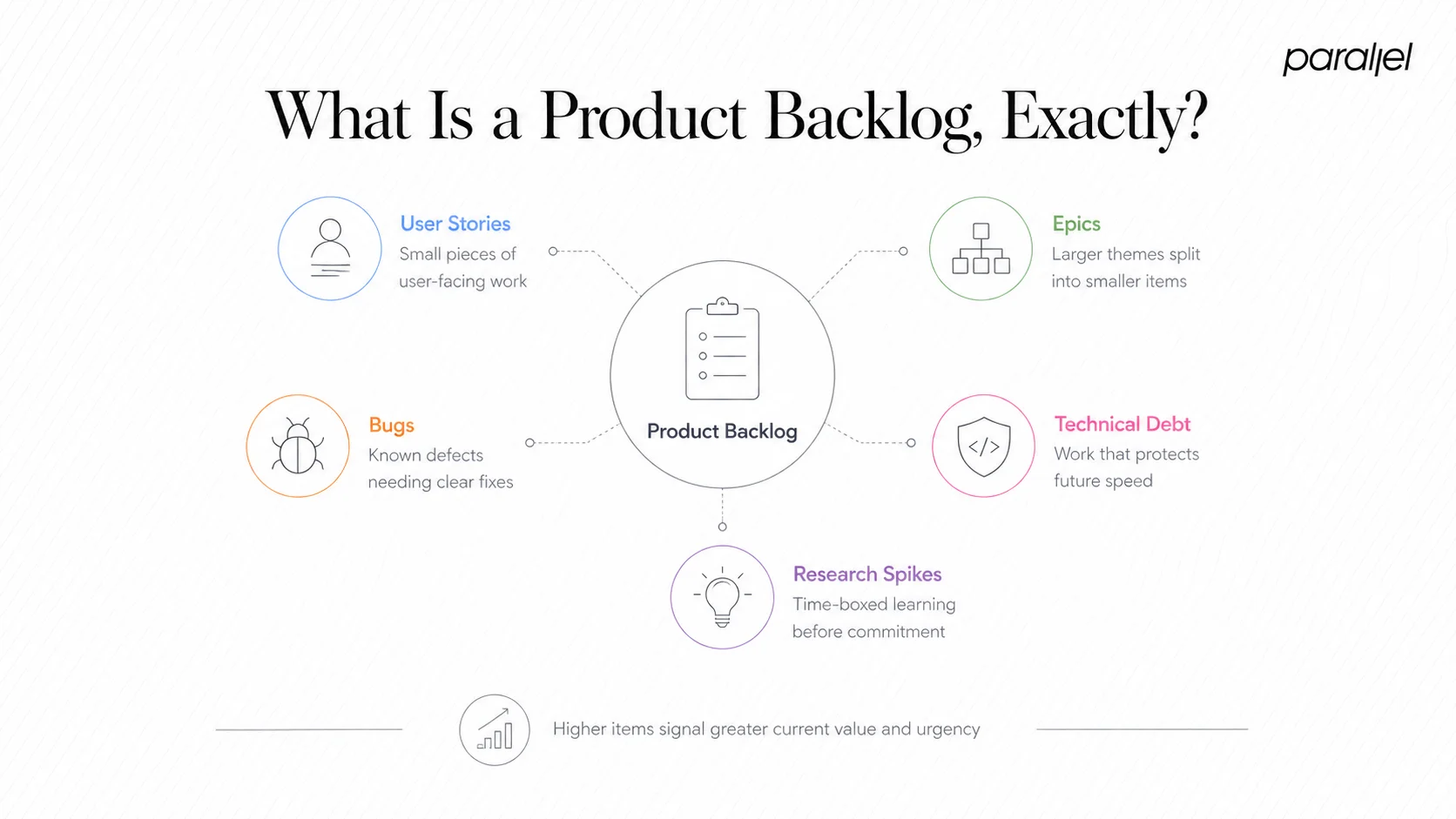
A product backlog is an ordered list of everything a product team wants to deliver — features, bug fixes, technical debt, design improvements, and research spikes. It's not a wish list and it's not a project plan. It's a living document that reflects current product strategy, updated as understanding deepens.
According to the Agile Alliance, the backlog represents the complete set of work the team acknowledges must be done to achieve the product goal. That distinction matters: the backlog is bounded by intent, not by what anyone could theoretically ask for.
Within the Scrum framework, the product owner holds accountability for the backlog's content, order, and availability. Every item in the list competes with every other item. The position of an item signals its relative value — higher means sooner.
Backlog items typically take several forms:
- User stories: Short descriptions of functionality from the user's perspective ("As a user, I can reset my password via email")
- Epics: Large bodies of work that decompose into multiple stories
- Bugs: Defects discovered in shipped functionality
- Technical debt: Architectural or code-quality improvements that unblock future speed
- Spikes: Time-boxed research tasks to reduce uncertainty before estimation
Each item should eventually carry acceptance criteria — the conditions under which the team agrees the work is complete. Without acceptance criteria, "done" becomes a moving target that burns trust between design, engineering, and QA.
For early-stage startups, the backlog also doubles as a forcing function for prioritization conversations. When a founder or PM says "we need to build everything," the backlog makes the trade-off visible: adding item A to the top means item B moves down. That friction is a feature, not a bug. If you're thinking about how to develop a product strategy alongside your backlog, the two documents reinforce each other — strategy explains the ranking, the backlog executes it.
The backlog is never finished, and that's by design. A healthy backlog grows, shrinks, and reorders as market conditions shift, user research surfaces new insights, and stakeholder priorities evolve. The measure of a good backlog isn't its length — it's its clarity.
How to Create a Product Backlog from Scratch
Building your first product backlog from zero is less intimidating when you treat it as a sequence of decisions rather than one giant planning session.
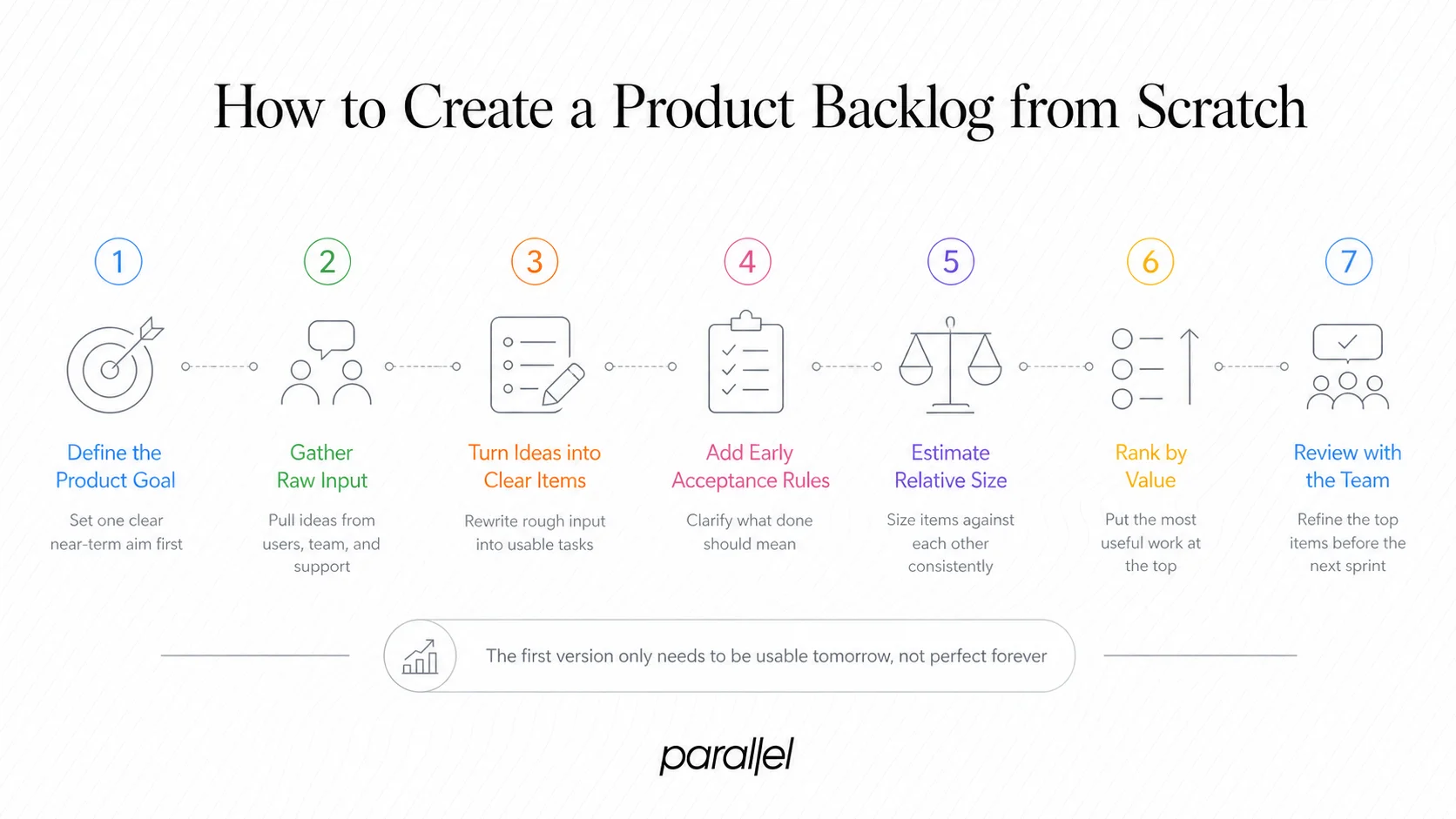
- Define the product goal: Before any items go in, write one sentence describing what the product must achieve in the next major horizon. Every backlog item should connect to this goal or be explicitly deprioritized.
- Run a discovery session: Gather input from stakeholders, support tickets, user interviews, and sales call recordings. Capture every idea without filtering — this is your raw intake.
- Convert ideas into structured items: Rewrite each idea as a user story or clearly scoped task. Attach rough acceptance criteria to anything you expect to build in the next two sprints.
- Estimate relative complexity: Use story points to size items relative to each other. Don't optimize for accuracy — optimize for consistency across the team.
- Apply an initial prioritization framework: Run items through the MoSCoW method (Must-have, Should-have, Could-have, Won't-have) or a simpler value vs. effort matrix. This produces your first ordered list.
- Enter items into a tool: JIRA, Linear, or even a structured Notion database works. What matters is that the tool is shared, searchable, and reflects a single source of truth.
- Schedule your first backlog refinement session: Walk the team through the top 10–15 items. Clarify ambiguities, refine estimates, and confirm the definition of ready for anything entering the next sprint.
The goal of this first pass isn't perfection. It's a backlog that your team can actually use in sprint planning tomorrow. Everything else gets refined iteratively.
For teams thinking about how this connects to the broader build process, our guide on what are 7 stages in new product development maps where backlog creation fits within the full product lifecycle.
Product Backlog vs. Sprint Backlog: What's the Difference?
These two terms are frequently conflated, and the confusion creates real coordination problems at sprint boundaries.
The product backlog is the source; the sprint backlog is a subset drawn from it during sprint planning. Only items that meet the definition of ready — meaning they are sufficiently detailed, estimated, and unblocked — should move from one to the other.
A common mistake I see in startup engineering teams: pulling items from the product backlog mid-sprint when "something urgent comes up." That urgency is usually real, but the cost — broken focus, incomplete stories, unreliable velocity tracking — is also real. The better practice is to log the urgent item in the product backlog, let the sprint complete, and reprioritize for the next cycle. If it's genuinely a P0 incident, treat it as an incident, not a backlog item.
This separation also matters for design teams. UI/UX work frequently needs a one-sprint head start to ensure designs are ready before engineers pick up a story. Understanding the boundary between the two backlogs helps design and product coordinate handoffs without blocking each other.
What Goes in a Product Backlog?
According to Aha!'s backlog guide, a well-structured backlog captures anything and everything the team might build — but the best teams are ruthless about what they keep visible versus what they archive.
Items that belong in an active product backlog:
- Customer-facing features: New capabilities derived from user research, sales feedback, or roadmap commitments
- Bug fixes: Defects with a defined user impact, scoped and reproducible
- Technical debt: Infrastructure, refactoring, or security work that reduces future friction
- Design and UX improvements: Accessibility fixes, interaction refinements, component library updates — these are not second-class items
- Spikes and research tasks: Time-boxed investigations before a complex feature is committed
- Compliance and regulatory work: Non-negotiable items that carry legal or contractual weight
Items that do NOT belong in a healthy backlog:
- Vague ideas without any user context ("make onboarding better")
- Duplicates that have been logged under different names by different stakeholders
- Items that have been deprioritized for more than three quarters with no plan to revisit
- Internal operational tasks that belong in a project management tool, not product planning
A backlog contaminated with noise is as dangerous as one with missing items. Teams spend refinement time arguing about zombie items instead of sharpening what's actually next. I recommend a quarterly audit: anything older than 90 days that hasn't moved gets either rewritten with fresh context or archived.
If you're writing acceptance criteria for these items, our deep-dive on given-when-then acceptance criteria is the most practical framework I've seen for keeping stories buildable.
How to Prioritize a Product Backlog When Everything Feels Urgent
Prioritization is the hardest part of product ownership, and it's where most startup PMs quietly fail. The challenge isn't knowing prioritization frameworks — it's applying them when a founder, a sales lead, and a power user are all in your inbox simultaneously.
The frameworks that actually hold up under pressure:
MoSCoW method: Classify each item as Must-have (ship-blocking), Should-have (high value but not critical), Could-have (nice to have), Won't-have (explicitly out of scope for this horizon). Must-haves claim the sprint; everything else queues.
RICE scoring: Score each item on Reach (how many users), Impact (how much it moves the metric), Confidence (how certain you are), and Effort (story points). Divide the first three by Effort to get a priority score. RICE works well for SaaS teams with enough usage data to estimate reach.
Stakeholder prioritization sessions: Bring stakeholders into a structured workshop rather than collecting competing Slack requests. Give each stakeholder a fixed number of "votes" to allocate across open items. This surfaces genuine priorities and reduces political pressure on the product owner.
The cost of delay lens: Ask: "What does it cost us — in revenue, trust, or competitive position — to delay this item by one sprint?" Some items look low-effort and high-urgency until you run this question and realize the cost of waiting is actually low.
For founders managing a minimum viable product phase, I'd add one more filter: does this item help you learn something you don't yet know about your users, or does it only serve users you already have? Early-stage, the former almost always ranks higher.
And when prioritization feels purely political, revisit your product goal statement. If an item doesn't connect to the goal, it has no legitimate claim to the top of the list regardless of who's asking for it.
Product Backlog Best Practices for Fast-Growing SaaS Teams
Scaling from 2 to 10 engineers breaks backlog habits that worked just fine when the team was small. These practices hold up at both stages.
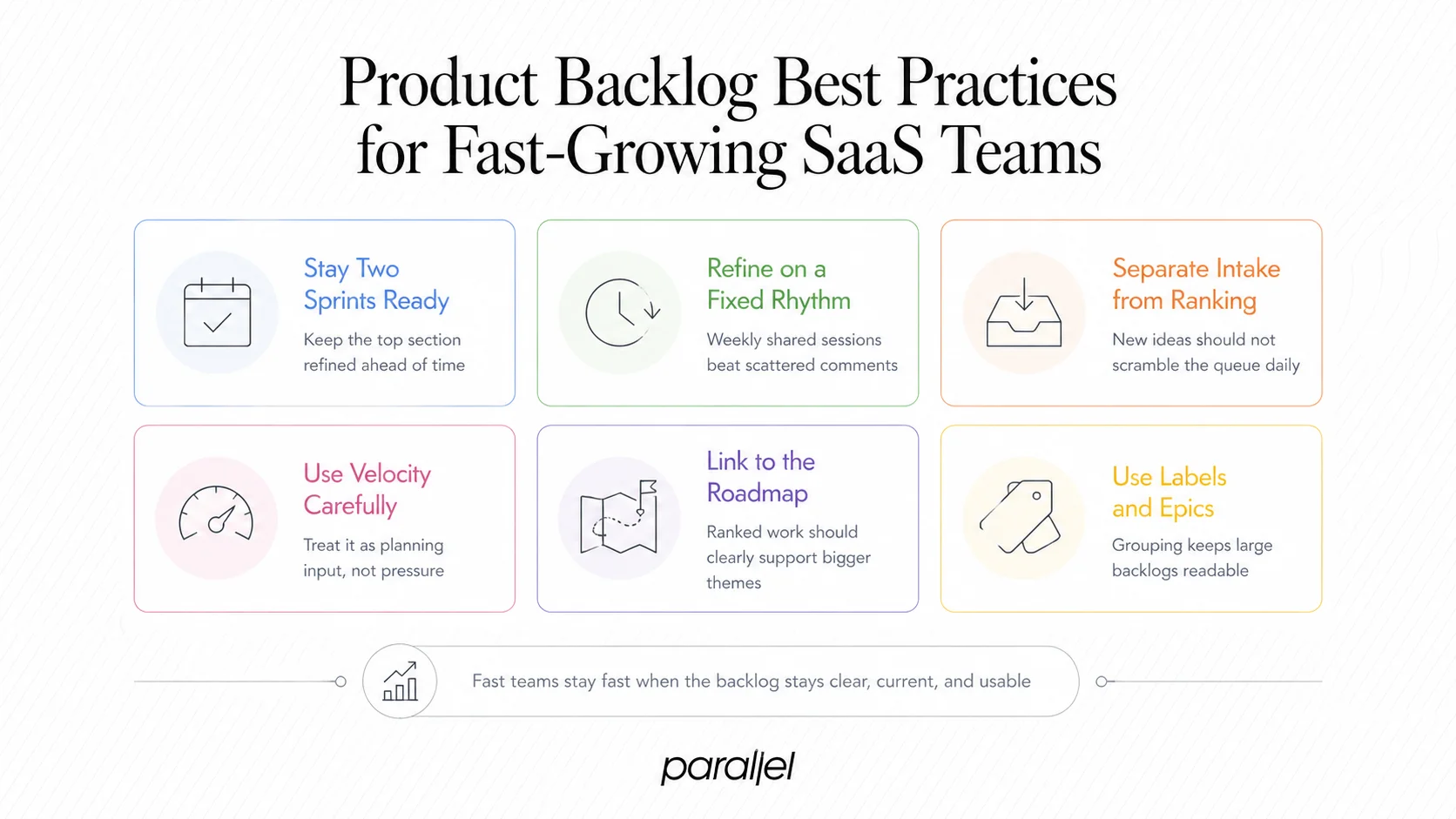
- Keep the backlog refined two sprints ahead. The top 20–30 items should always meet the definition of ready: scoped, estimated, and unblocked. Anything below that horizon can stay rough.
- Run structured backlog refinement, not ad-hoc grooming. A 60-minute weekly sprint grooming session with the full team is more effective than async comments scattered across tickets. Use that time to clarify acceptance criteria, break down epics, and re-rank based on new information.
- Separate intake from prioritization. Have one channel or form for stakeholders to submit ideas. Review and triage weekly, but don't let every new submission trigger a re-ranking conversation. Protect the team's planning stability.
- Track velocity, but don't worship it. Velocity tracking tells you how much the team can realistically pull into a sprint. It's a planning input, not a performance metric. Treating it as the latter creates sandbagging and burnout.
- Align the backlog with the product roadmap. The roadmap communicates direction to stakeholders; the backlog is how that direction becomes shipped software. If items in the backlog don't trace back to roadmap themes, something is misaligned. Our guide on how to develop a product roadmap walks through that alignment process in detail.
- Use labels and epics aggressively. A flat list of 200 tickets is unnavigable. Group items under epics, tag by theme (growth, retention, infrastructure), and filter views by sprint horizon.
How Do Design and Product Teams Align on Backlog Priorities?
This is the question most product and design articles avoid, so I'll be direct: design and engineering backlogs that run independently create the worst kind of waste — engineering waiting on specs, or design shipping assets for features that got deprioritized.
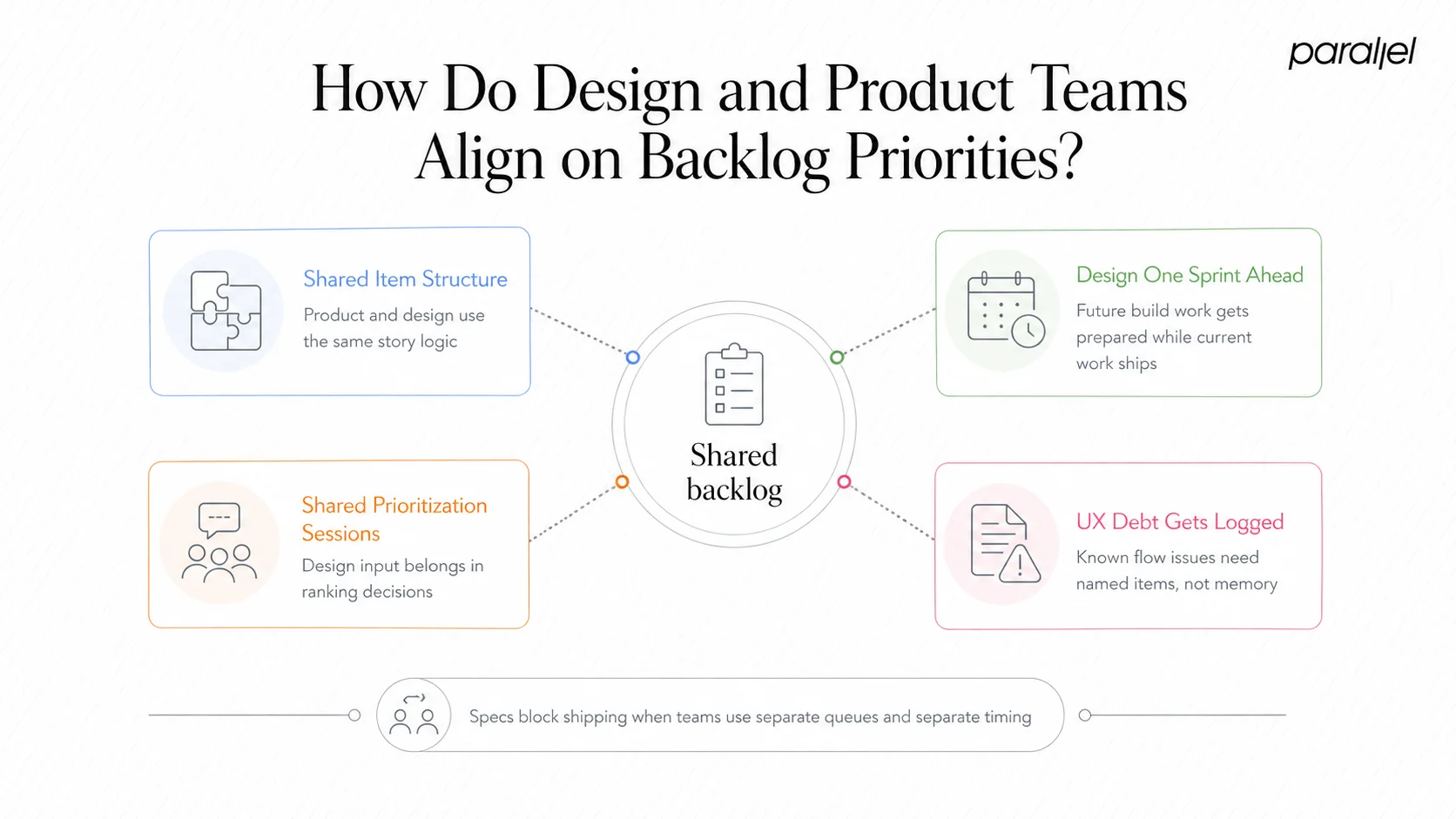
The solution is a shared backlog with a design-ahead lane.
Here's how it works:
- Design works one sprint ahead of engineering. Stories in the design lane are being actively designed while the current sprint's engineering work runs in parallel.
- Design items carry the same structure as engineering items — user stories, acceptance criteria, and a definition of ready (wireframes signed off, copy finalized, edge cases documented).
- Prioritization sessions include design leadership. A design lead or UX strategist should be in every sprint planning and backlog refinement meeting. Design feasibility and research debt are legitimate inputs to prioritization.
- UX debt gets backlog items, not hallway conversations. If a shipped flow has a known usability problem, it should exist as a named, estimated backlog item — not as tribal knowledge the design team carries.
At ParallelHQ, when we partner with startups on product design, we push hard for this shared structure from day one. The design handoff problem is almost always a backlog structure problem in disguise. If you're thinking about why design sprints work within this system, they function best as a tool for resolving high-uncertainty backlog items before they hit engineering.
Teams using the SAFe framework formalize this further with PI Planning, where design, product, and engineering align backlogs across multiple teams for an entire program increment. For smaller teams, the principle translates: align early, align often, put it in writing.
Conclusion
A product backlog is only as useful as the discipline behind it.
- Define every item with enough clarity that any team member can pick it up cold.
- Prioritize by value and cost of delay, not by who asked loudest.
- Align design and engineering into a shared lane so specs never block shipping.
- Refine continuously — a stale backlog is just a list of regrets.
The teams that ship consistently aren't the ones with the most ideas. They're the ones who know which idea matters right now and have the system to prove it.
Frequently Asked Questions
Q1: Who owns the product backlog?
The product owner holds primary accountability in the Scrum framework, but ownership is collaborative. Engineers contribute effort estimates, designers flag feasibility, and stakeholders provide business context. The product owner makes the final call on ordering.
Q2: How long should a product backlog be?
There's no universal rule, but a backlog longer than 200 items is almost always hiding noise. Keep the top 30 items refined and ready; archive anything that hasn't moved in two quarters. Length is less important than clarity and actionability.
Q3: What's the difference between an epic and a user story?
An epic is a large body of work that spans multiple sprints and decomposes into smaller user stories. A user story is a single, buildable unit of functionality deliverable within one sprint. Epics set direction; stories move the sprint board.
Q4: How often should a product backlog be updated?
Continuously, with structured refinement at least weekly. Major reprioritization should happen at the start of each sprint cycle. Quarterly audits help clear out stale or irrelevant items that accumulate over time.
Q5: Can a startup use a product backlog without Scrum?
Absolutely. The product backlog concept applies equally to Kanban teams, shape-up teams, or any structured Agile methodology. The underlying principle — a prioritized, shared source of work — is framework-agnostic and valuable regardless of how your team runs sprints.
Q6: What makes a backlog item "ready" for a sprint?
An item meets the definition of ready when it has a clear user story, defined acceptance criteria, a story point estimate the team agrees on, and no unresolved dependencies blocking its start. Designs should be finalized and edge cases documented before it enters sprint planning.

check out these related blogs