Generative AI in Product Design: Use Cases & Limits | ParallelHQ
Generative AI in Product Design: Use Cases & Limits. Independent, regularly-updated comparison from ParallelHQ.
Table of Contents
I have seen dozens of startup teams scramble to "add AI" over the last year. They often treat it as a feature list rather than a fundamental shift in how they build and design. If you are navigating this new landscape, understanding the boundaries of generative AI in product design: use cases & limits is non-negotiable.
Quick Answer/TL;DR
GenAI significantly accelerates design workflows (copy, synthesis, rapid ideation) and can enhance personalization for the end user. Its limits are accuracy (hallucinations), lack of genuine user empathy, and the potential to build overcomplicated, low-trust interface experiences that hurt activation.
How do you think clearly about generative AI in product design?
The hype cycle around AI can make it difficult to make good product decisions. We find that teams typically fall into one of two traps: either they ignore AI because they assume it cannot handle creative work, or they hand the keys to the model and expect it to solve every UX problem. Both positions are wrong.
In my experience, the only way to build a truly robust product with AI is to treat it as an augmented intelligence framework, not a standalone creator. A recent 2025 study on design productivity indicated that teams using generative models for initial concept generation were over 30% faster but often required human intervention to ensure usability.
We have seen teams use AI to speed up the mundane, giving them more room to focus on the complex. If you can clearly define the specific [user research] problem you are solving, AI can often accelerate the solution. If you cannot define the problem, AI will just help you make a bad product faster.
What are the practical use cases for generative AI in the design process?
The primary keyword here—use cases—is where we focus first. We must distinguish between AI used within the final product experience and AI used by the design team as part of their [product development] process. Both are important, but they require different distinct approaches.
The following table summarizes how we prioritize these internal design use cases based on impact and reliability observed in mature teams:
We are particularly interested in the "Definition" and "Prototyping" phases. I’ve helped teams who were stalled during onboarding design because they couldn't agree on the right sequence or language. Using GenAI to generate 20 variations of [saas onboarding] copy in seconds is incredibly effective. It shifts the discussion from "I like this one" to a data-backed comparison.
Another strong use case is accelerating the initial stages of [mvp development]. AI can quickly synthesize patterns from common industry data, helping you find [gap in market] opportunities without spending months on desk research. It gives you a starting point based on general knowledge that you must then test with real users.
Where do product teams go wrong with generative AI implementation?
While the use cases look promising, the "limits" part of the conversation is often where startup teams struggle. Most implementation errors stem from misunderstanding the fundamental difference between what a Large Language Model (LLM) is good at (pattern matching and text prediction) and what good product design requires (empathy, critical thinking, and context).
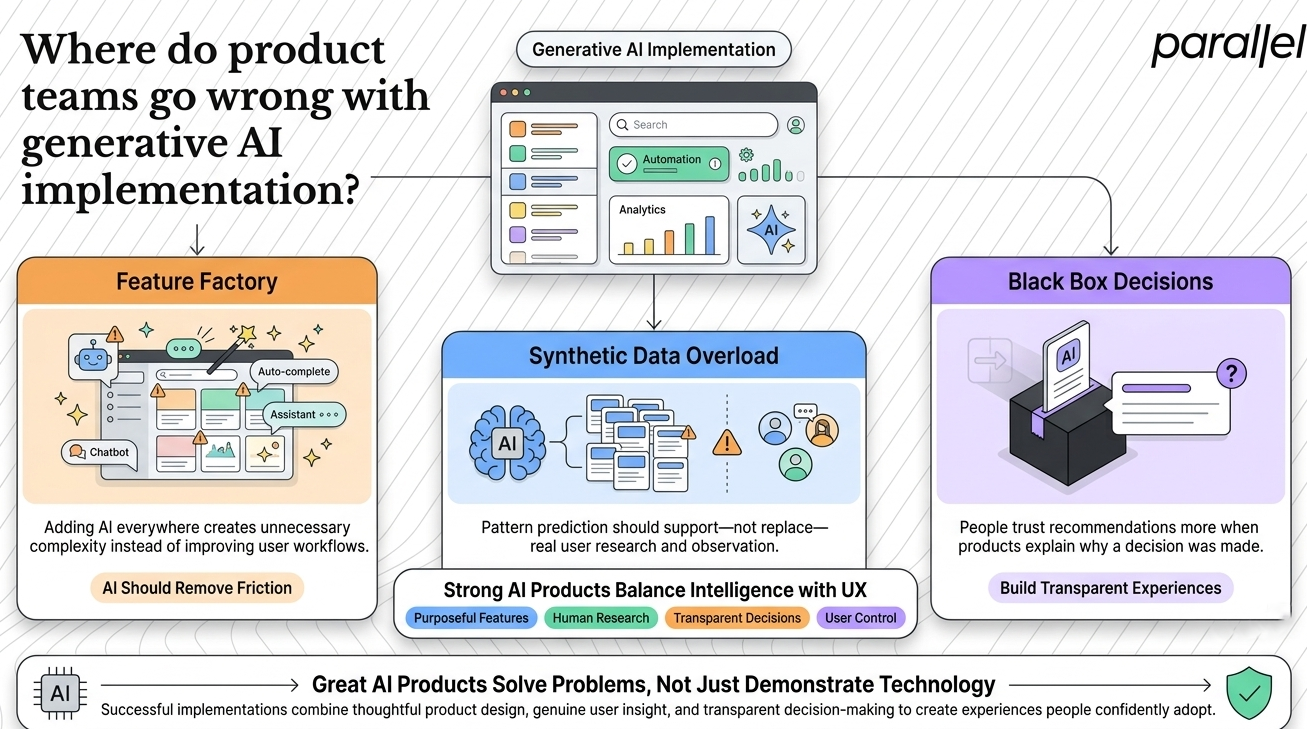
We frequently see three major patterns of failure when teams misuse generative AI in product design: use cases & limits:
1) The "feature factory" approach
This occurs when a team builds AI features simply because they can, not because they should.
We worked with a SaaS tool that added an AI chatbot for advanced features. Their goal was higher activation. In reality, new users were overwhelmed.
Users don't want to type long prompts to achieve a simple task they could perform with two clicks in a traditional [interaction design] flow. The team had added friction under the guise of intelligence. We helped them simplify, moving the AI interaction behind the scenes, using it to anticipate the next best action rather than forcing the user to invent the action themselves.
2) Over-reliance on synthetic data
This is the most dangerous limit. AI models cannot experience human emotion. They have not sat in on your [field study].
While synthetic data can help populate a prototype for [wireframing-prototyping], it cannot replace the depth of genuine [user research]. We have seen teams make major UX pivots based on an AI's prediction of user anxiety. This is a bad bet. AI can predict patterns, not human feelings. It does not know the actual [mental models] or specific anxieties of your user segment.
3) Erosion of user trust (the black box problem)
If users don't know why an AI-driven decision was made, they will not trust your product. This is particularly critical in [fintech design services] or [healthtech design services], where we have deep experience.
A 2025 survey on AI adoption found that 45% of users cited trust as a major concern when using new AI tools. If you use GenAI to personalize a flow or recommend a setting, you must provide transparency. Why this recommendation? Why now? Failing to answer this results in low activation and weak [product adoption].
What are the primary structural limits of generative AI in product design?
Beyond implementation mistakes, certain boundaries are structural to the current technology. These limits define when you must put the AI tools away and return to foundational product strategy.
The core limitation is that AI operates on a statistical understanding of the world, not an empathic or strategic one.
- No understanding of strategic context: GenAI might help you draft a product vision, but it has no skin in the game. It does not understand the nuance of your competitive landscape or your unique [distinctive competence]. It cannot tell you why you should build a product, only how you might phrase its purpose.
- Difficulty with brand consistency: It is extremely hard to train a model to perfectly replicate a specific brand voice or adhere to a complex, mature [design systems] framework without error. The resulting output often feels "close, but not quite right." This requires significant design and development effort to police.
- Lack of original thought: While AI can remix existing patterns creatively, it struggles to generate truly novel concepts that break from established paradigms. If you are trying to fundamentally disrupt an [opportunity mapping] space, the model will likely give you common, conventional solutions.
- The homogeneity trap: When every team uses the same underlying models to generate interfaces or copy, products start to look and sound identical. If everyone uses a generic [saas web design agency] style powered by the same few prompts, your product will fail to differentiate.
The real differentiation comes from clear product thinking and knowing which problems are worth solving, which is a key part of our approach to [design and strategy].
How to use generative AI to improve user onboarding and activation?
Personalization is a massive opportunity for startups, and it’s a strong use case for generative AI in product design: use cases & limits. While generic onboarding flows are common, AI allows us to move toward adaptive onboarding that responds in real-time to user behavior.
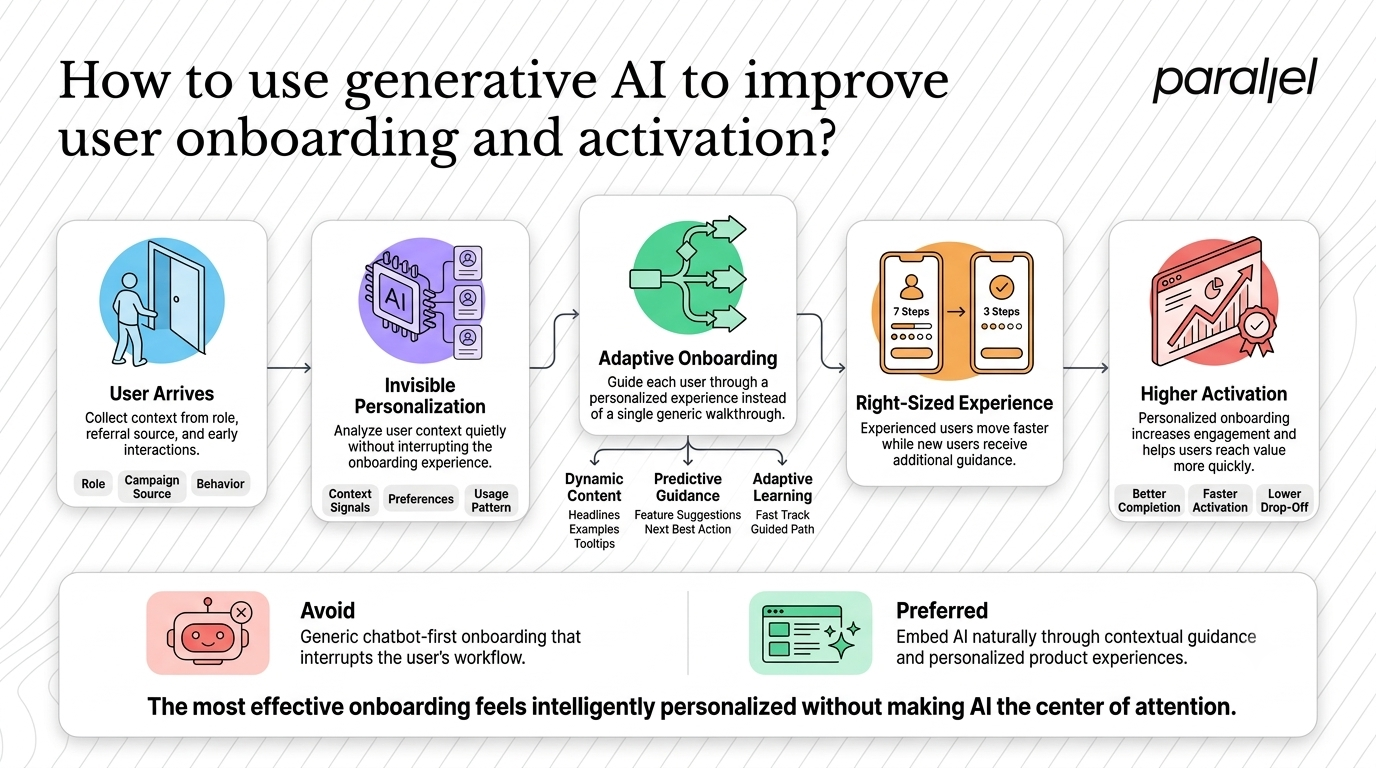
This is not about putting a chatbot in the corner. That is an agency-style fluff solution that often backfires. Instead, think about "invisible AI."
Consider how you can apply generative AI in product design: use cases & limits to personalization by structuring user interactions carefully:
- Dynamic content adjustment: Change the headlines, examples, and tooltips in your [saas onboarding] experience based on the user's role or source (e.g., if they came from a specific marketing campaign). This is more than A/B testing; it’s an audience of one.
- Predictive next-best-action: Analyze the user's initial interaction pattern and proactively offer guidance or suggest a feature only when they appear to need it. This reduces cognitive load, adhering to [Hick's Law].
- Adaptive learning paths: If a user is moving through the product quickly, skip the basics. If they are struggling, slow down and provide more support.
This approach requires an [AI preparedness design scorecard] to understand if your product data can even support this level of personalization.
We helped an [edtech design services] client apply this model. Their standard 7-step walkthrough had high abandonment. We used a simple model to identify user familiarity, and those who were more experienced were routed through a streamlined 3-step path. This adjustment, grounding the design in real user capability, saw a measurable increase in new user activation. We focus on clarity in these UX decisions, especially when implementing complex technology.
Conclusion
We are deeply integrated into the world of AI design. We’ve even built our own products (like [Pageloop]) and partnered with leading AI startups like [Sarvam AI].
AI is the most significant acceleration tool for product teams in decades. It forces designers to move up the value chain from pixel-pushing to product thinking and strategy. If you ignore it, you will be slower than your competitors.
However, in my experience, the core challenge has never been about having enough ideas or generating enough pixels. It has always been about clarity in product thinking and UX decisions.
AI will only amplify whatever strategic clarity you already possess (or lack).
FAQ
1) What exactly is generative AI in product design?
It is the practice of using generative AI models (like LLMs or diffusion models) both as tools within the design workflow to increase efficiency (use cases) and as components of the final product to enhance user value (e.g., personalization). The "limits" refer to the technological boundaries (accuracy, hallucinations) and human boundaries (trust, empathy) that define where AI should not be applied.
2) Where should startups start when using generative AI in product design?
Start with your design process, not your product features. Use AI tools to synthesize [user research] data (use a human as the filter), generate variations of [saas onboarding] copy, or create images for brainstorming. These internal use cases have the lowest risk and the clearest ROI. They help you [train AI model] effectively within your team.
3) Is generative AI reliable enough for user research or testing?
Only for synthesis and initial structuring. GenAI is fantastic for summarizing dozens of interview transcripts or identifying potential themes during [thematic ai] analysis. However, it cannot replace actual [usability testing] with real humans. AI can predict common reactions based on generic statistical models, but it cannot know the specific anxieties, anxieties, or joys of your users in their actual environment.
4) Will generative AI in product design replace human designers?
No. It will change the role of the designer. AI is excellent at generating variations of a defined solution, but it is poor at defining the right solution to the right problem. Designers will focus less on execution (creating visual assets from scratch) and more on strategy, synthesis, and systems thinking (connecting the AI output to user needs and business goals, using mature principles like [gestalt theory] where appropriate).
5) How does generative AI design differ from traditional user experience design?
GenAI-driven design is dynamic; traditional design is static. In traditional design, the designer maps out every possible user flow and visual state in advance. In AI design, the designer creates the system, constraints, and objectives, and the AI generates the appropriate output (e.g., a personalized interface state) dynamically based on the current user context. The focus shifts to designing the logic behind the experience.
7) What are the main UX limits when using AI as a final product feature?
The key limits are unpredictability and a lack of transparency. AI models sometimes hallucinate or make recommendations that don’t align with user expectations. If you personalization is invisible (e.g., changing the UI without explanation), users will get confused or lose trust (the black box problem). Clear [interaction design] must always be present to provide feedback and allow the user to control the AI.
8) Are there any specific tools required to integrate AI into my design workflow?
Many standard tools are integrating these capabilities natively. The most common entry point is Figma with its native AI tools or various plugins for copy generation and synthesis during [wireframing-prototyping]. For actual implementation within a SaaS product, teams use APIs from providers like OpenAI, Anthropic, or specialized services, and manage development using tools like LangChain.
9) Is generative AI design right for early-stage startups?
Yes, if you use it to move faster and build smarter. It is perfect for accelerating the discovery and ideation stages of [mvp development]. However, if you are using it as a shortcut to skip [user research] or avoid making difficult product decisions, it will lead you astray. Successful AI implementation requires deep [product strategy] consulting first to ensure you are automating the right things.

As the Founder and CEO of Parallel, Robin spearheads a pioneering approach to product design, fusing business, design and AI to craft impactful solutions.