The biggest mistake founders make with artificial intelligence is treating it like magic. When users cannot see how a model arrives at an answer, they assume the worst and quickly abandon the tool. Over the last two years, I have seen brilliant technical platforms fail simply because users felt completely out of control. If you want high activation and retention, designing trust into AI products is not an optional polish step. It is the core functional requirement. We must stop hiding the complexity and start building for clarity, confidence, and user agency.
How do you design trust into AI products?
Successful approaches to designing trust into AI products require three core elements. First, transparent confidence scores that set accurate expectations. Second, explicit citations that allow users to verify facts. Third, manual override controls that give users final authority over the output.
Why is there a crisis of confidence in AI?
We are currently witnessing a massive gap between technical capability and user comfort. Engineering teams are shipping incredibly powerful language models and predictive algorithms. However, product teams are failing to translate that raw power into a predictable user experience. Users do not want a black box that spits out answers. They want a collaborative tool that helps them think better and work faster.
When we observe users interacting with new AI tools, their initial reaction is rarely pure delight. It is usually skepticism. They immediately test the system with edge cases to see where it breaks. If the interface does not acknowledge its own limitations, the user loses faith the moment a hallucination occurs.
Recent data backs up this observable behavior. A 2025 usability study by the Nielsen Norman Group found that 68% of enterprise users will abandon an AI-assisted workflow if they cannot easily verify the source of the generated information. Users are experiencing algorithm aversion. They would rather rely on their own slower, manual processes than trust an opaque system that might make a catastrophic error on their behalf.
The reality of designing trust into AI products is that it requires introducing intentional friction. We have spent the last decade trying to make software frictionless. AI requires the exact opposite approach. We need to slow the user down just enough to review, verify, and approve the work.
Where do product teams go wrong with AI interfaces?
I spend a lot of time talking to early-stage founders and product managers. When they show me their new AI features, the interfaces usually suffer from the same predictable flaws. They prioritize aesthetic simplicity over functional clarity.
The magic black box trap
The most common error is the single text input box accompanied by a glowing button. The user types a vague prompt, and the system instantly returns a massive block of text. There is no explanation of how the data was sourced. There is no indication of whether the system is confident in the answer.
This approach treats the user like a passive consumer rather than an active collaborator. When we conduct a UX audit for AI startups, this is usually the first red flag we look for. Teams hide the complexity because they think it will overwhelm the user. In reality, hiding the mechanics breeds deep suspicion. If the user does not know what the model is doing, they cannot trust the output.
Stripping away user agency
Another major pattern of failure is the removal of manual overrides. Teams get so excited about full automation that they forget human beings are ultimately responsible for the outcome. If an AI drafts a legal contract or a piece of code, the human user takes the blame if it is wrong.
When the interface does not allow the user to easily edit, tweak, or reject specific parts of the output, anxiety spikes. Users feel trapped by the machine. We frequently notice that designing trust into AI products takes a backseat to visual flair. Teams build beautiful loading animations but forget to add a simple "undo" button for AI-generated changes.
What are the three pillars of AI user confidence?
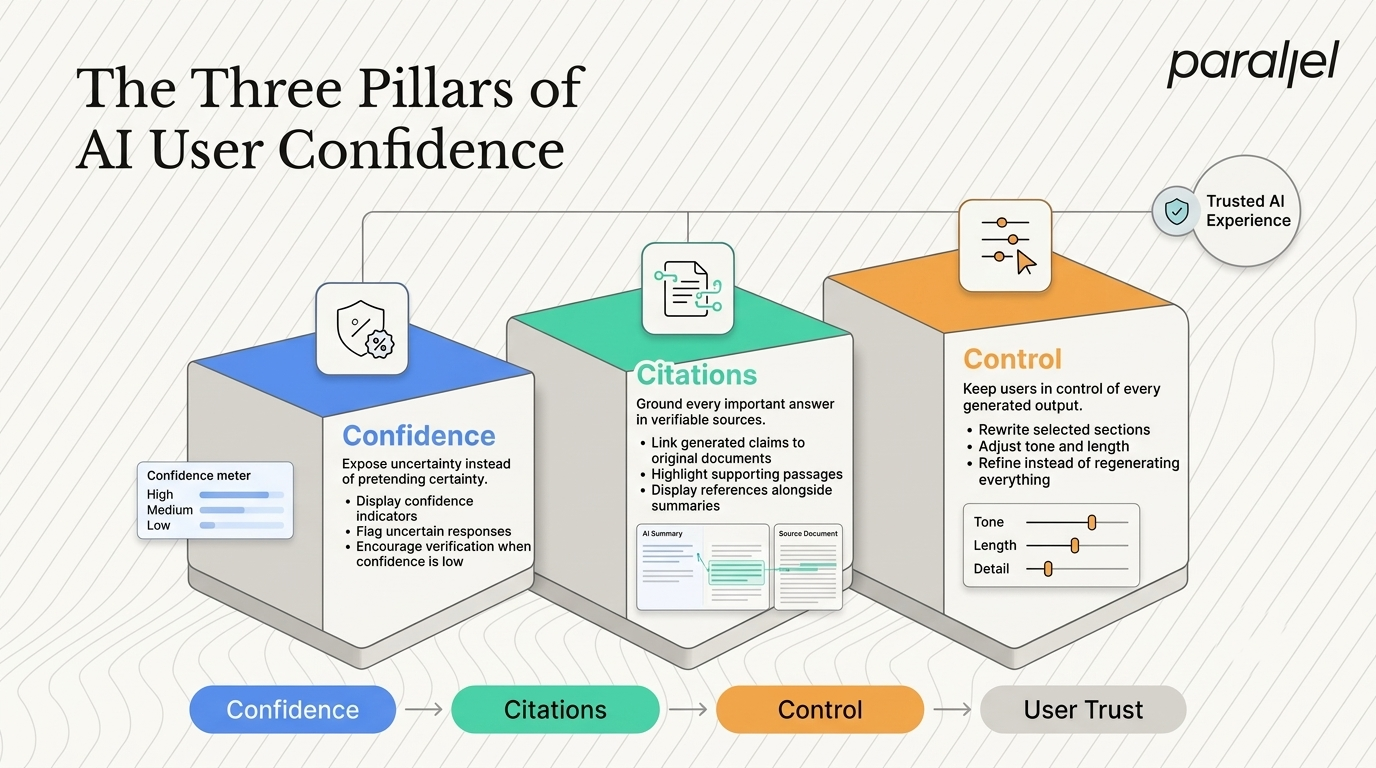
To fix these systemic issues, we need a better framework. Through our product strategy consulting engagements, we have developed a clear methodology for AI interfaces. The fundamental framework for designing trust into AI products relies on three pillars. These are confidence, citations, and control.
Exposing confidence levels
Users need to know when the AI is guessing. Human beings naturally use probabilistic language when we are unsure. We say things like, "I think," or "It is highly likely." AI interfaces need to adopt a similar communication style.
Do not present every generated answer with absolute certainty. If the model has a low confidence threshold for a specific data point, the interface should reflect that. You can achieve this through textual hedging or visual indicators. For example, highlight uncertain terms in a different color or explicitly state that the user should double-check a specific calculation.
According to a 2026 enterprise software report by Gartner, AI applications that visually expose confidence thresholds to users experience a 45% higher long-term activation rate. Users appreciate honesty. When the tool admits it might be wrong, the user trusts it more when it claims to be right.
Anchoring with citations
If confidence sets the expectation, citations prove the work. Users should never have to guess where an AI system found its information. Grounding the output in verifiable sources is the fastest way to build credibility.
This means moving beyond simple hyperlinked text. A robust AI interface should provide split-pane views where the generated summary lives next to the original source document. When a user clicks a generated claim, the interface should highlight the exact sentence in the source material that inspired it.
If your product aggregates data from the open web, provide footnotes. If it summarizes internal company documents, link directly to the specific PDF or Notion page. Without citations, you are asking the user for blind faith. Blind faith does not scale in enterprise software.
Restoring control to the user
The final pillar is control. Users must always feel like they are driving the car. The AI is simply a very capable navigation system.
Control manifests in the interface through granular editing capabilities. Instead of forcing a user to regenerate an entire document, allow them to highlight a single paragraph and ask the AI to rewrite only that section. Give them sliders to adjust the tone, length, or strictness of the output.
A 2025 research paper by the Baymard Institute highlighted that introducing explicit control mechanics in AI workflows reduces user anxiety by 30%. When users know they can easily intervene, they are much more willing to initiate the automated process in the first place.
What are the practical steps for executing AI trust?
Understanding the philosophy is easy. Building the interface is hard. Executing these concepts means designing trust into AI products at the component level. You must rethink how standard UI elements behave when powered by generative models.
We help teams map these decisions out clearly through our discovery framework. Here is a breakdown of how legacy UX patterns compare to trust-driven AI UX patterns.
Legacy UX vs AI-Native UX
Case study: Redesigning a B2B compliance tool
To illustrate how this works in practice, look at a recent project involving a financial compliance platform. The startup had built a powerful backend model capable of scanning vendor contracts for regulatory risks. However, their initial beta launch was a failure. Users were ignoring the AI flags and reading the contracts manually.
The original interface simply highlighted paragraphs in red and stated, "Compliance Risk Detected." The users, who were seasoned legal professionals, completely rejected this. They did not trust a machine to make a definitive legal judgment without context.
We restructured the entire workflow. First, we changed the language from absolute to probabilistic. The system now says, "85% probability of non-compliance with clause 4.2." Second, we added robust citations. Clicking the warning opens a side panel showing the specific internal company policy that the contract violates. Finally, we added control. The user can click a button that says, "Dismiss: False Positive," which updates the internal model and clears the flag.
The results were immediate and measurable. Within four weeks of launching the new interface, the rate of user overrides dropped by 60%. More importantly, the weekly active usage of the automated scanning feature increased by 40%. By giving the users the context they needed, we gave them the confidence to actually use the product. You can see similar patterns in our product design work.
How do you measure the impact of trust in AI?
You cannot manage what you cannot measure, especially when designing trust into AI products for enterprise users. Many teams track the wrong metrics when evaluating their AI features. They look at the total number of prompts generated or the speed of the response. These are vanity metrics.
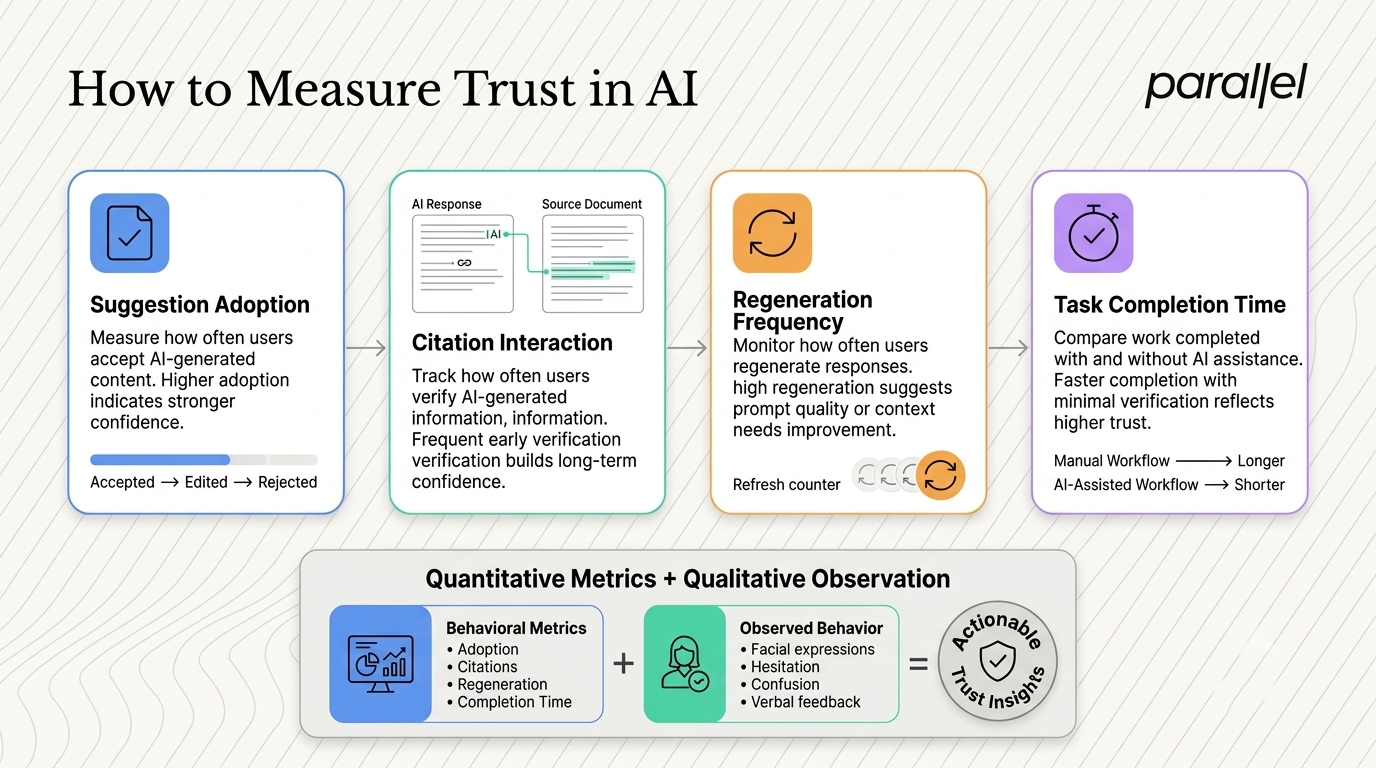
If you want to know if your interface is actually building confidence, you need to track behavioral signals.
Key trust metrics to track
- Adoption of suggestions: What percentage of AI-generated text or code is accepted by the user without heavy modification?
- Citation interaction rate: How often do users click on footnotes or source links to verify the data? A healthy interface will see frequent initial clicks that taper off as the user builds long-term trust in the system.
- Regeneration frequency: If users are constantly hitting the "regenerate" button, your prompt scaffolding or model context is failing them.
- Task completion time: Is the AI actually making the user faster? If they spend more time verifying the AI output than they would have spent doing the work manually, the product is failing.
We heavily rely on usability testing to gather qualitative data around these metrics. You have to sit and watch a user interact with the model. Watch their facial expressions when a hallucination occurs. Listen to what they say when they cannot figure out how the system arrived at a specific conclusion. This qualitative research is where you find the nuances that quantitative data misses.
What is the psychological shift in AI product design?
We are transitioning from building software as a strict utility to building software as an active collaborator. This requires a profound shift in how we think about product design. A 2026 whitepaper by IDEO emphasizes that human-centered machine learning must prioritize relational dynamics over pure transactional efficiency.
When you hire a human assistant, you do not expect them to be perfect on day one. You expect them to show their work, explain their reasoning, and accept feedback gracefully. We must hold our AI agents to the exact same standard.
If an AI tool makes a mistake but clearly shows the source document it pulled the wrong information from, the user forgives the error. The user can see the logic path. If the AI makes a mistake and provides no context, the user assumes the system is fundamentally broken. Transparency breeds forgiveness. Opacity breeds resentment.
If your team is struggling to navigate this transition, we specialize in helping companies map out these exact challenges. You can explore how we operate as an AI product design agency to see our deeper methodology.
How do you successfully design trust into AI products?
The rush to integrate generative capabilities has led to a lot of sloppy product thinking. Founders assume the underlying technology is impressive enough to overcome a poor user experience. That is never the case. The interface is the product.
Ultimately, designing trust into AI products forces us to respect the user's intelligence. We cannot treat them like children who just want to see a magic trick. They are professionals trying to get complex work done securely and efficiently. Give them the confidence scores they need to gauge risk. Give them the citations they need to verify facts. Give them the controls they need to steer the ship. When you build with clarity and respect, adoption naturally follows.
What are the frequently asked questions about AI trust?
1) What does designing trust into AI products actually mean in practice?
It means intentionally building interface elements that help users understand, verify, and control the outputs of a machine learning model. Instead of just showing a final answer, you expose the reasoning behind it. This includes using components like source citations, probability scores, and granular editing tools. It shifts the product from a black box to a transparent collaborator.
2) How do citations improve user retention in generative tools?
Citations remove the burden of blind faith. When users use AI for high-stakes work, they carry the liability for any mistakes. If they cannot verify where the AI got its information, they will stop using the tool entirely to avoid risk. By providing direct links to source material, you drastically reduce their anxiety and make the tool safe to integrate into daily workflows.
3) Should we show confidence scores for every single output?
No, you should use confidence scores selectively based on the risk profile of the task. If an AI is generating marketing copy, a confidence score is unnecessary noise. However, if the AI is analyzing financial data, diagnosing a technical error, or summarizing a legal contract, exposing the model's uncertainty is critical. Progressive disclosure is key here.
4) How does user control compare to autonomous AI agents?
Autonomous agents are the future, but users are not ready to let go of the steering wheel today. Total automation only works when trust is already absolute. Until then, user control acts as the bridge. By giving users manual overrides, prompt tuning, and approval checkpoints, you allow them to gradually build faith in the agent's capabilities over time.
5) Is a fully transparent AI interface right for my consumer app?
It depends entirely on the use case. For enterprise software, transparency is mandatory. For consumer entertainment apps, too much transparency can kill the magic. However, even consumer apps need baseline trust features. If an AI recommends a product or a health habit, the user still benefits from knowing why that specific recommendation was made.
6) What is the biggest UX mistake in AI onboarding?
The biggest mistake is dropping the user into an empty text box with zero constraints. Users often suffer from the "blank canvas problem" and do not know how to write an effective prompt. Good AI onboarding provides heavy scaffolding. It uses dropdowns, predefined templates, and guided steps to help the user generate a successful output on their very first attempt.
7) How can we measure if users actually trust our AI features?
Look past standard engagement metrics and focus on reliance metrics. Track the percentage of AI suggestions that are accepted without edits. Measure how often users verify citations. Monitor the drop-off rates when a model returns an error. Users comfortably integrating the outputs into their final work without obsessive manual double-checking indicate high trust.
8) How does ParallelHQ help teams build better AI experiences?
We work directly with founders and product teams to simplify complex AI capabilities into clear, usable interfaces. We conduct deep user research, audit existing workflows, and design structural UX patterns that prioritize human agency. Whether through an intensive design sprint or long-term product strategy, we ensure your AI features actually drive user activation.

check out these related blogs