What Is AI UX Design? Definition, Examples & Best Practices | ParallelHQ
What Is AI UX Design? Definition, Examples & Best Practices. Independent, regularly-updated comparison from ParallelHQ.
Table of Contents
We see early-stage teams bolt chat interfaces onto legacy products and call it AI design. It rarely works. Building intelligent products requires a fundamental shift in how we think about user behavior, cognitive load, and trust. If you are asking, what is AI UX design? definition, examples & best practices are exactly what we will unpack here. At ParallelHQ, we help founders simplify complex product decisions. In this guide, I will show you how to move beyond AI hype and build interfaces that actually solve user problems.
Quick Answer / TL;DR
AI UX design integrates artificial intelligence into digital products to create adaptive, personalized interfaces. It shifts design from static screens to dynamic interactions, prioritizing user trust, transparency, and contextual assistance over generic chat windows.
Decoding the core question: what is AI UX design? definition, examples & best practices
To understand the shift in product design, you must understand the transition from deterministic to probabilistic systems.
In traditional UX, if a user clicks a button, the outcome is always exactly the same. The system is deterministic. In AI UX, the system is probabilistic. The outcome changes based on context, learning, and data models. This fundamental difference breaks most legacy design patterns.
A 2025 study by the Nielsen Norman Group highlighted this exact shift. They found that while AI can generate wireframes and layouts rapidly, the real challenge lies in designing the end-user experience. It is no longer just about arranging pixels. It is about anticipating needs and managing expectations when the system generates variable outputs.
We have moved away from designing a single perfect user journey. Instead, we are designing guardrails for dynamic interactions. We must design for scenarios where the system is highly confident and scenarios where it is guessing.
Here is a breakdown of how the paradigm is shifting:
When founders ask me, what is AI UX design? definition, examples & best practices often boil down to one word: calibration. You must calibrate how much the system automates versus how much control the human retains.
Why has user trust become the ultimate benchmark for product success?
For the last decade, product teams measured success by usability. We wanted to know how fast a user could complete a task. With AI, speed is no longer the only metric that matters. Trust is the foundation of every successful AI product.
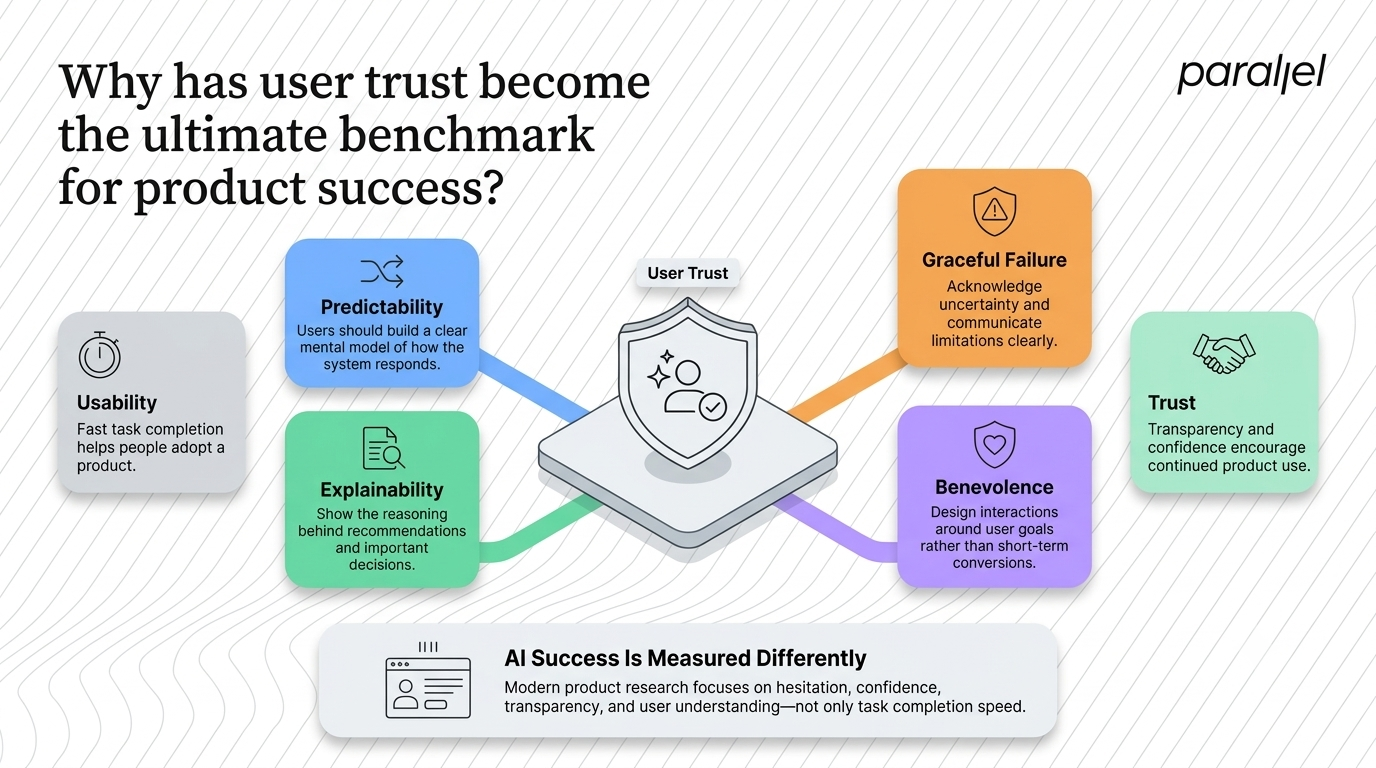
If an algorithm reallocates a financial portfolio without a clear rationale, the user will panic. If a medical AI suggests a diagnosis without showing its supporting data, a doctor will reject it. Usability gets people into your product, but trust keeps them there.
Recent 2025 insights from UserTesting show that measuring AI experiences requires a completely different approach. Researchers are now tracking behavioral signals like hesitation, confusion, and disengagement. They are looking at micro-moments where users pause to question the system.
Trust in AI is built on four core pillars:
- Predictability: The user needs a clear mental model of how the system will react.
- Explainability: The system must show its work and explain its reasoning.
- Graceful Failure: The system must admit when it does not know the answer.
- Benevolence: The system must prioritize the user's goals over business conversions.
In our own user research projects, we consistently see that users prefer a slightly slower, transparent AI over a fast, opaque one. Transparency builds confidence.
Where do product teams fail when applying AI in UX?
In my experience, this is where most product decisions go wrong. Teams treat AI as a feature to be added, rather than a capability to be deeply integrated. They rush to market with poorly considered interfaces that frustrate users.
The most common mistake is the lazy chat interface. Teams take a highly complex B2B workflow and replace it with a blank text prompt. They assume users want to type out long instructions. In reality, a blank canvas causes massive cognitive overload. Users do not always know what the system is capable of, and they do not know what prompts will yield the best results. We have written extensively about this trap in our guide on UX and AI chatbots.
Another major pitfall is the black box automation trap. This happens when a product makes decisions on behalf of the user without showing its work. It strips the user of their agency. When an automated action fails, the user feels helpless because they do not understand how the error occurred.
Finally, teams often fail to design fallback workflows. AI models hallucinate. They return incorrect data. If you ignore the fundamentals of what is AI UX design? definition, examples & best practices, your product will feel erratic and untrustworthy when these inevitable errors occur. You must design the failure state just as carefully as the success state.
What are the foundational best practices for AI product design?
Good AI design feels invisible when it is working well and highly transparent when it is making decisions. Over the years, we have developed a clear framework for this at ParallelHQ. Here is how we approach it during our product strategy consulting engagements.
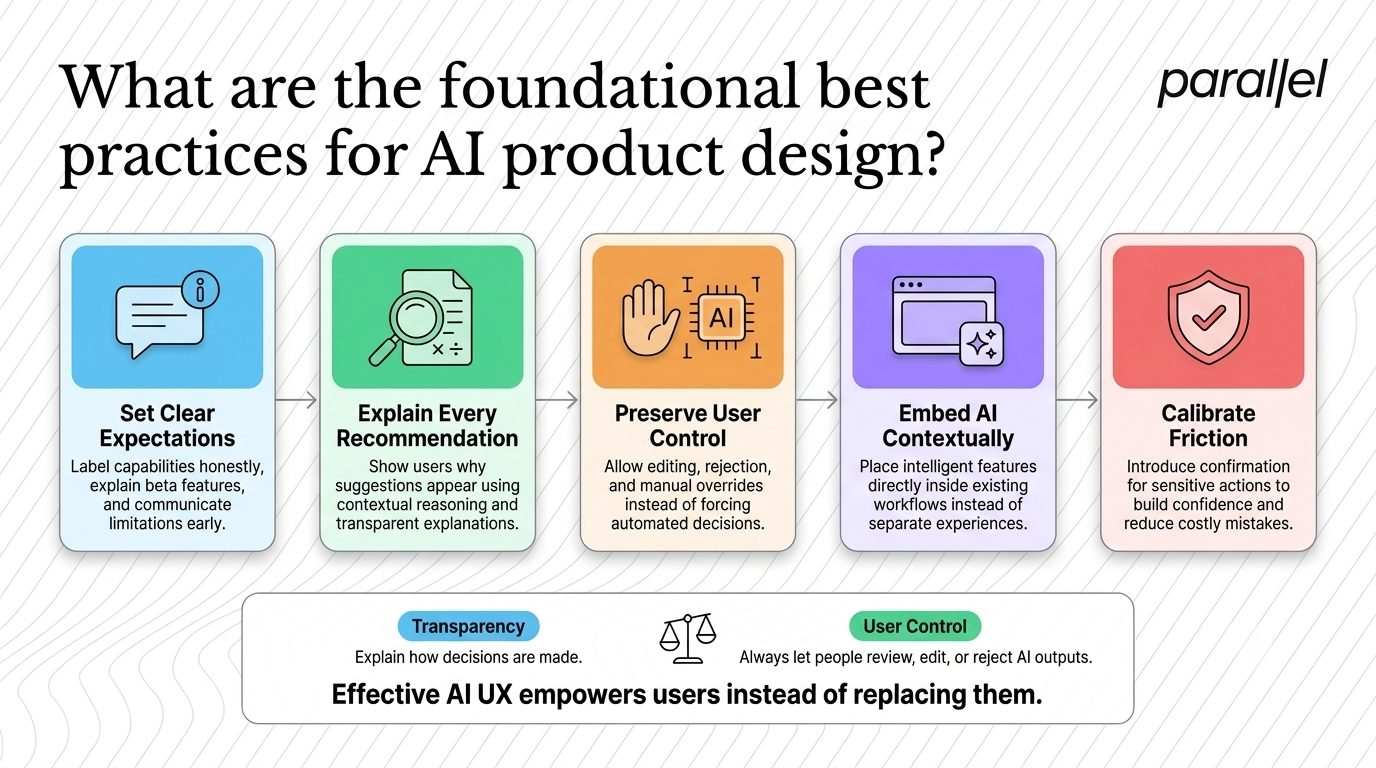
1) Set clear expectations immediately: Do not over-promise on your AI's capabilities. If your feature is in beta, label it clearly. Use onboarding tooltips and empty states to honestly communicate what the system is good at and where it struggles. Managing expectations prevents immediate churn.
2) Provide explainability and show the math: If your product suggests a specific action, tell the user why. Use phrases like "Based on your recent activity..." or "Because you selected X, we recommend Y." This grounds the AI's output in reality. It gives the user a logical thread to follow. We dive deeper into this in our piece on designing AI transparency.
3) Preserve manual overrides and user control: The system should act as a co-pilot, not an autopilot. Always allow the user to reject an AI suggestion or edit the output directly. If an AI generates a block of text, do not just offer a "regenerate" button. Let the user click into the text and rewrite the awkward parts themselves.
4) Embed AI contextually: Do not force users to leave their current workflow to access the AI. Bring the intelligence to them. If they are reading a data table, put the synthesis tools right next to the column headers. Contextual placement reduces friction dramatically.
5) Calibrate friction carefully: Sometimes, you need to slow the user down. If an AI is about to execute a high-stakes action, introduce a mandatory confirmation step. Strategic friction forces the user to verify the AI's intent, which ultimately increases their overall confidence in the tool.
For anyone researching what is AI UX design? definition, examples & best practices always point back to user control and system transparency. It is about empowering the user, not replacing them.
How do you design user interfaces for AI hallucinations and errors?
AI models will make mistakes. They will hallucinate facts, misinterpret intent, and generate irrelevant content. If you design your interface under the assumption that the AI is always right, you will destroy user trust rapidly.
First, normalize errors in your UX copy. Do not present AI outputs as absolute facts. Use phrases like "Here is a draft" or "This might help" rather than "Here is the final answer." Language shapes perception. When you soften the delivery, users are far more forgiving of minor computational errors.
Second, provide granular feedback mechanisms. A simple thumbs-up or thumbs-down button is rarely enough for complex generative outputs. If an AI writes a 500-word report, a thumbs-down does not tell the system which paragraph was wrong. Allow users to highlight specific text and provide targeted feedback. This improves the model over time and gives the user a sense of agency.
Finally, build high-quality fallback states. When the system fails to generate a response, do not just show a generic error code. Provide a clear path forward. Suggest alternative prompts, offer a manual workflow, or connect the user to human support. Graceful degradation is a hallmark of mature product design.
What are some strong examples of AI UX in real products?
You do not need to look at experimental research labs to see good AI UX. The best examples are already integrated into products that millions of people use every day. By 2026, over 88 percent of organizations reported using AI regularly in at least one business function. The companies winning this race prioritize interface design.
- GitHub Copilot (Contextual Assistance): Copilot is a masterclass in contextual AI. It does not force developers to open a separate window to ask for code. Instead, it lives directly inside the code editor. As the user types, Copilot suggests completions in a subtle gray font. The user simply presses the Tab key to accept the suggestion. It is low friction, highly contextual, and perfectly preserves user agency.
- Netflix (Adaptive Interfaces): Netflix represents the pinnacle of personalization at scale. The platform does not just recommend content. It dynamically alters the user interface based on behavior. The thumbnail artwork for a movie will change depending on the genres you frequently watch. The order of the rows shifts based on your historical viewing times.
- Notion AI (Embedded Actions): Notion handles generative AI brilliantly. Instead of a standalone chatbot, the AI is deeply tied to the text blocks. You highlight a paragraph and a small menu appears, offering options to summarize, rewrite, or change the tone. The AI exists exactly where the work is happening.
- Grammarly (Calibrated Friction): Grammarly handles AI interventions with exceptional care. It does not auto-correct complex sentence structures without permission. Instead, it highlights the text and provides a clear rationale for its suggestion. The user must actively click to accept the change. This keeps the user in the driver's seat while providing powerful assistance.
We apply these exact same principles in our own AI software design services. We consistently find that placing AI actions adjacent to relevant data increases user engagement. To truly grasp what is AI UX design? definition, examples & best practices must be observed in these micro-interactions, not just large platform overhauls.
How do you measure the success of an AI interface?
Integrating AI changes how we measure product success. Traditional analytics will only tell you half the story. You need a new framework to understand how users perceive your intelligent features. If you are running a UX audit on an AI product, you must look beyond basic conversion rates.
Here are the new metrics you need to track:
- Correction Rate: How often do users manually edit or reject the AI's output? A high correction rate indicates that your model lacks context or your interface is setting the wrong expectations.
- Automation Trust: If your system suggests a configuration change, how often does the user accept it without modification? This is a direct measure of perceived system reliability.
- Time to First Value (TTFV): Does the AI actually speed up the user's workflow? If they spend more time writing prompts than they would have spent doing the task manually, your design has failed.
- Feature Disengagement: Do users try the AI feature once and never return? This usually points to a severe mismatch between the marketed capability and the actual user experience.
We strongly recommend reading industry reports on the future of design with AI to see how leading teams are adjusting their analytics dashboards to capture these nuanced behaviors.
How do we transition our product thinking for the AI era?
Moving your team from traditional software development to AI-native thinking is a significant cultural shift. It requires breaking down entrenched silos between design, engineering, and data science.
First, you need to understand your data infrastructure. Design cannot fix a broken data pipeline. The quality of your AI UX is directly limited by the quality of the data feeding it. If your data is messy, your user experience will be messy.
Second, start small. Do not try to redesign your entire platform as an AI agent. Look for specific, high-friction moments in your user journey. Can AI summarize a long document? Can it pre-fill a complex form based on historical data? Find small wins that deliver immediate user value. Our discovery framework is structured to help teams identify these high-impact opportunities without overcommitting resources.
Finally, involve users early and often. Prototyping AI is difficult because the outputs are unpredictable. You must put dynamic, functional prototypes in front of real users to see how they react when the system fails. Exploring what is AI UX design? definition, examples & best practices is the first step toward building that magic, but rigorous user testing is what makes it real.
Conclusion
Building AI products is a humbling experience. It forces product leaders to relinquish absolute control over the interface and trust the system to adapt. However, the core job of a product designer remains entirely unchanged.
We still advocate for the user. We still protect their cognitive load. We still build systems based on trust and clarity. The underlying technology is vastly more powerful, but the human needs driving the adoption of that technology are exactly the same.
Ultimately, mastering what is AI UX design? definition, examples & best practices will define the next generation of software. The technical tools will continue to evolve, but clear, grounded product thinking will always win the market.
Frequently Asked Questions
1) Why is everyone talking about AI UX design?
The launch of powerful generative models changed how software is built globally. Founders are now looking for structured ways to integrate AI without ruining their existing user experience. It has become a mandatory business requirement for product survival in 2026.
2) What is the core difference between traditional UX and AI UX?
Traditional UX relies on static, predictable user flows where every click has a predefined outcome. AI UX is dynamic, probabilistic, and adaptive. The interface changes based on user behavior, context, and real-time data inputs.
3) How do you test an AI interface with real users?
You cannot rely on static screens or basic click-through prototypes. You need dynamic testing environments where users experience realistic AI delays, errors, and variable outputs. This allows you to observe how they handle unpredictable system behavior in real time.
4) Is adding an AI chat window enough for my SaaS product?
In most cases, absolutely not. Hiding core functionality behind a generic chat interface often increases cognitive load because users do not know what to ask. The best AI integrations are contextual and exist seamlessly where the user is already doing the work.
5) How do we prevent AI features from breaking user trust?
Always design for explainability and transparency. If the AI makes a decision or recommendation, it must clearly tell the user why. Additionally, you must provide easy, frictionless ways for the user to override or correct the AI output.
6) What metrics indicate a successful AI user experience?
Standard metrics like task completion still matter, but they are not enough. You must also track trust metrics, such as the algorithm correction rate, feature retention over time, and behavioral signals like user hesitation during complex tasks.
7) Is investing in AI UX right for my early-stage startup?
If your product relies on complex data synthesis, deep personalization, or heavy content creation, then yes. However, if your product is a simple transactional tool, forcing AI into the workflow might overcomplicate the experience unnecessarily.
8) How does ParallelHQ help teams with AI product design?
We partner with early-stage startups and product leaders to simplify complex AI interfaces. We focus on clear product thinking, deep user research, and grounded design decisions rather than just chasing the latest AI trends.

As the Founder and CEO of Parallel, Robin spearheads a pioneering approach to product design, fusing business, design and AI to craft impactful solutions.


