What Is a Design System? Benefits & When You Need One | ParallelHQ
What Is a Design System? Benefits & When You Need One. Independent, regularly-updated comparison from ParallelHQ.
Table of Contents
I frequently hear product leaders ask: what is a design system? benefits & when you need one are often misunderstood, leading teams to either over-engineer their products too early or wait until their interface becomes a fragmented mess. In my years working with early-stage startups and enterprise teams at ParallelHQ, I have seen the damage caused by bad design infrastructure. Teams lose velocity. Developers write redundant code. Users lose trust due to inconsistent interfaces. Today, I want to cut through the noise and give you a practical framework for scaling your product design.
Quick Answer
A design system is a centralized collection of reusable components, standards, and code snippets that manage design at scale. You need one when UI inconsistencies begin slowing down your development cycle and crippling your design team's velocity.
What exactly is a design system and how does it differ from a style guide?
When we start a new engagement with a scaling startup, we often ask to see their existing design documentation. Usually, they hand us a PDF with some hex codes, fonts, and a logo. They call it their design system. But in reality, that is just a style guide.
The Nielsen Norman Group defines a design system as a complete set of standards intended to manage design at scale using reusable components and patterns. It is not just a visual reference. It is a living, breathing product that serves other products.
A true design system bridges the gap between design and engineering. It ensures that when a designer places a primary button in Figma, a developer has the exact corresponding React or Vue code ready to deploy.
To make this clear, we break down the terminology into three distinct buckets.
- Style guide: A static document outlining brand colors, typography, and tone of voice.
- UI kit: A collection of visual components in a design tool (like buttons, form fields, and dropdowns) without any connected code.
- Design system: The full package. It includes the style guide, the UI kit, documented usage guidelines, and the actual coded components developers use in production.
Why do founders ask what is a design system? benefits & when you need one?
Startups move fast. In the early days, you are focused on finding product-market fit. You hire a freelance designer, they build a few screens, and your engineering team hardcodes the interface to get the product out the door.
But then you start growing. You hire more developers. You bring on a full-time product team. Suddenly, you realize you have fourteen different button styles across your application. Your users are confused because a dropdown on the settings page behaves entirely differently than a dropdown on the checkout page.
Why do founders ask what is a design system? benefits & when you need one? Because they feel the pain of design debt.
When teams ask me, "what is a design system? benefits & when you need one," I always point them to the cost of inconsistency. Every time an engineer has to guess the padding on a modal window, you lose money. Every time a designer builds a new date picker from scratch, you lose time.
We recently did a UX audit for a fast-growing SaaS company. They were struggling to ship new features. Upon investigation, we found their engineering team was spending nearly 30% of their weekly sprints just writing custom CSS for basic UI elements that already existed elsewhere in the app. They lacked a single source of truth.
Without centralized guidelines, teams rely on memory or guesswork. This creates friction, slows down product releases, and ultimately harms the user experience.
What are the proven benefits of a design system for scaling teams?
If you are researching "what is a design system? benefits & when you need one," you likely already have a scaling problem. The good news is that the return on investment for building proper design infrastructure is massive and highly measurable.
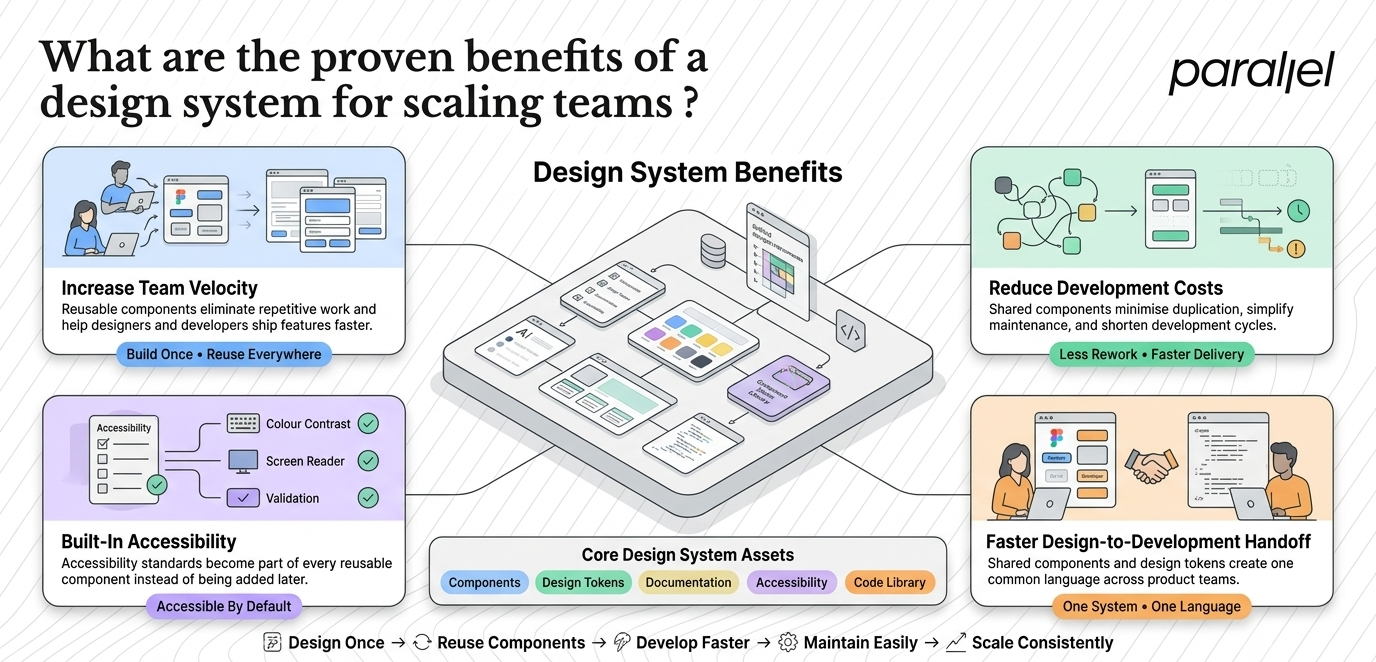
Industry data confirms what we see in our daily work. According to the Zeroheight Design Systems Report 2025, 79% of tech teams now have a dedicated design systems team, up from 72% in 2024. Organizations are realizing that investing in infrastructure saves money in the long run.
Here is exactly how a structured approach impacts your bottom line.
1) Massive gains in team velocity
When designers do not have to reinvent the wheel, they work faster. Figma and Sparkbox reported in their 2024 studies that designers using established design systems complete tasks 34% faster than those without one.
For developers, the impact is even more profound. Having pre-built, code-backed components accelerates feature delivery by up to 47%. Instead of writing front-end code from scratch, developers simply pull the approved component from the library and plug it in.
2) Significant reduction in development costs
Time is money. When you speed up the design and development cycle, your operational costs drop. McKinsey's research highlights that streamlined systems can cut 30 to 40% of development costs through reduced duplication and technical debt.
3) Better accessibility and compliance
Accessibility is no longer optional. Modern systems embed accessibility standards (like WCAG guidelines, proper color contrast, and keyboard navigation) directly into the component level. If your core button component is built to be accessible, every single button across your entire platform automatically meets those standards.
4) Seamless designer-to-developer handoff
Handoff is usually where product teams bleed the most time. A robust system provides a shared language. A designer says, "Use the primary modal with large padding." The developer knows exactly what that means because the variables and tokens match perfectly between Figma and the codebase.
When do you actually need a design system for your product?
This is where I offer a strong word of caution. You do not always need a massive, robust system from day one. Exploring what is a design system? benefits & when you need one becomes critical once you hire your third designer, but doing it during the initial MVP phase can actually kill your startup.
At Parallel, we guide teams through different stages of product maturity. Here is a framework to help you decide when to invest.
The MVP Stage (Do not build a system yet)
If you are still searching for product-market fit, a complex system will slow you down. You need to iterate rapidly. Your interface might change completely next week based on user feedback.
- What to do instead: Use an off-the-shelf UI library (like MUI or Chakra UI). Keep a simple Figma file with basic typography and colors. Focus your energy on MVP development and learning from users.
The Scaling Stage (Time to build)
You have product-market fit. Your team is growing. You have multiple designers and a squad of engineers. This is the exact moment you need to lay the foundation.
- Warning signs you are ready:
- Onboarding new designers or developers takes weeks instead of days.
- QA testers constantly flag visual inconsistencies (wrong colors, misaligned buttons).
- Shipping simple features takes longer than it used to.
- Designers are duplicating work across different files.
The Enterprise Stage (Mandatory infrastructure)
If you manage a suite of products, a system is mandatory. For instance, when we design for fintech companies, the complexity of data tables, dashboards, and mobile apps requires strict governance. Without it, the brand experience fractures completely.
What does a healthy design system architecture look like?
Understanding the theory is great, but how is it actually structured? The most successful design teams rely on the principles of Atomic Design. This methodology breaks interfaces down into their smallest possible parts.
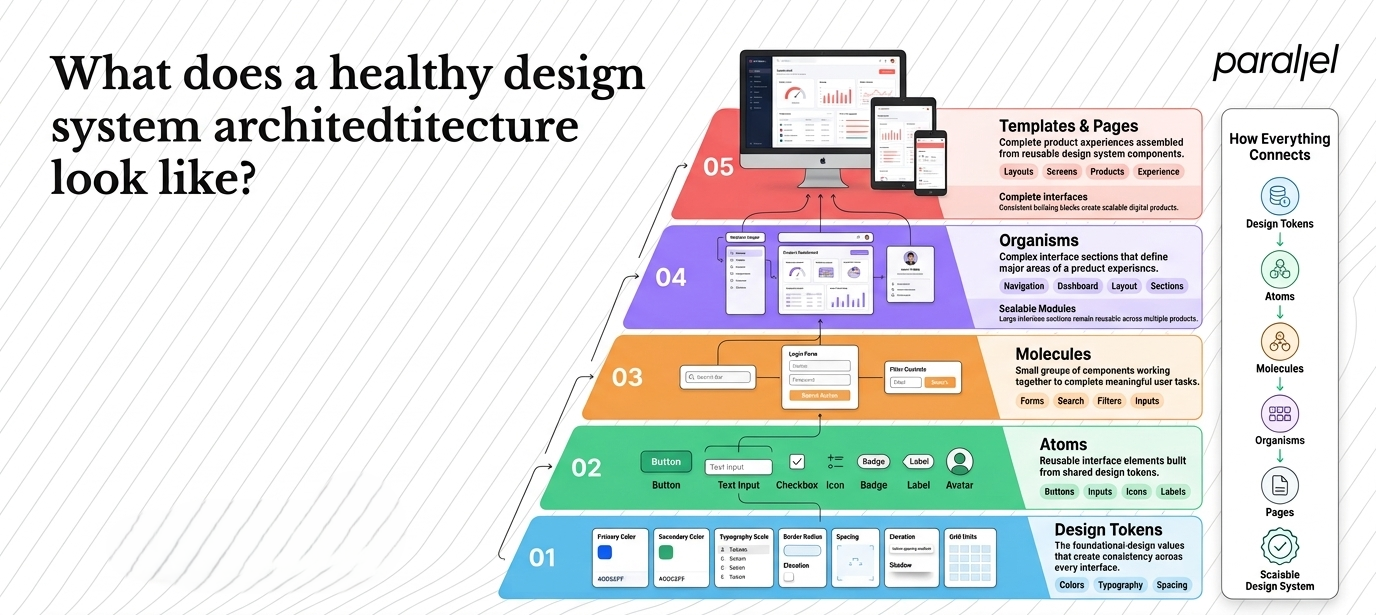
Here is the hierarchy we use to build scalable products.
- Design Tokens: The absolute smallest building blocks. These are raw values translated into code (e.g., color-brand-primary: #0052FF). Tokens ensure that if you ever rebrand, you change one token value, and it updates across the entire product ecosystem.
- Atoms: Basic HTML elements combined with tokens. Think of a simple text input field, a label, or an icon.
- Molecules: Simple groups of UI elements functioning together. For example, a search form consisting of a label (atom), an input field (atom), and a button (atom).
- Organisms: Relatively complex UI components composed of groups of molecules. A website header containing a logo, navigation links, and a search form is an organism.
- Templates and Pages: These are the layouts that provide context to the components, showing exactly how the final interface will look with real content.
How is AI changing the way we build design systems in 2026?
We cannot talk about the future of product building without addressing Artificial Intelligence. The landscape of AI UX design is moving incredibly fast, and it is directly impacting how teams manage their component libraries.
The 2025 Zeroheight report noted that 71% of teams expect to use AI automation within their workflows soon. We are already seeing this shift happen in real time with our clients.
- Automated documentation: Writing usage guidelines for components used to take hours. Now, AI tools can generate baseline documentation directly from Figma component properties.
- Code generation: Tools are becoming highly proficient at translating visual tokens into production-ready React or Tailwind code.
- Predictive patterns: Advanced systems can now suggest which UI component a designer should use based on the context of the screen they are building.
While AI will not replace the strategic thinking required to structure your system, it drastically reduces the manual labor required to maintain it.
How should you build a design system without over-engineering it?
When we help clients figure out what is a design system? benefits & when you need one, we focus on practical scalability. We strongly believe in starting small and treating the system like a product itself.
Here is our step-by-step approach to building design systems that actually get used.
Step 1: Conduct a visual audit
Before building anything new, you have to clean up the mess. We ask teams to screenshot every button, form, modal, and tooltip currently in production. We put them all on a massive virtual whiteboard. Seeing 20 different variations of a "Submit" button usually creates the internal alignment needed to fund the project.
Step 2: Establish the foundational tokens
Do not start by drawing buttons. Start by defining your design tokens. Lock in your exact color palette, typography scales, spacing grids, and shadow elevations. These tokens will power everything else you build.
Step 3: Build the core components first
Do not try to build every component you will ever need. Start with the elements you use every single day.
- Buttons (Primary, Secondary, Tertiary, Disabled states)
- Form inputs and text areas
- Checkboxes and radio buttons
- Dropdown menus
- Modals and dialog boxes
Once you have these core elements standardized, you will have solved 80% of your interface inconsistencies.
Step 4: Write clear usage guidelines
A button component is useless if no one knows when to use it. Document the rules. State clearly: "Use the primary button only once per page for the main call to action." Include rules for edge cases, error states, and accessibility requirements.
Step 5: Establish strict governance
Systems die without ownership. You need a process for adding new components or modifying existing ones. Assign a dedicated owner (usually a lead designer or a cross-functional squad). When a product designer encounters a unique problem, they should have a clear path to propose a new component to the system.
Conclusion
Building scalable products requires discipline. Relying on freelance UI kits or hoping your engineers guess the right hex codes will eventually catch up to you.
I hope this guide has answered "what is a design system? benefits & when you need one" for your startup. By treating your design infrastructure as a living product, you empower your designers to focus on complex problem-solving and enable your developers to ship features at incredible speed. If you need a partner to help audit your current UI or build a scalable system from the ground up, explore our product strategy consulting services. Let the system do the heavy lifting so your team can focus on innovation.
What are the frequently asked questions about what is a design system? benefits & when you need one?
1) To summarize, what is a design system?
At its core, a design system is a comprehensive library of reusable visual components, documented guidelines, and corresponding code. It benefits your team by speeding up development, reducing errors, and ensuring visual consistency. You need one when your team grows beyond a handful of people and UI inconsistencies begin to slow down your release cycles.
2) What is the ROI of implementing this kind of infrastructure?
The ROI is highly measurable in time saved and errors avoided. Industry data shows that teams with mature systems can reduce design and development costs by up to 40%. It eliminates redundant work, meaning your expensive engineering talent spends time building new features instead of tweaking CSS padding on buttons.
3) Can a startup survive with just a UI kit instead of a full system?
Yes, but only temporarily. A UI kit (just the visual assets in a design tool) is fine for the MVP stage. However, as soon as you have multiple developers working in parallel, a UI kit falls short because it lacks the synchronized code and documentation required to prevent divergence between design and production.
4) How long does it take to build a foundational system?
Starting from scratch, an initial core system (tokens, basic components, and documentation) typically takes a dedicated team 4 to 8 weeks. However, it is never truly "finished." It must evolve alongside your product, requiring ongoing maintenance and governance.
5) Who should own the system within a product team?
Ideally, it should be co-owned by design and engineering. In smaller teams, a Lead Product Designer usually acts as the gatekeeper. In larger organizations, a dedicated DesignOps team or a specific squad of designers and front-end developers manage it full-time.
6) What are design tokens and why do they matter?
Design tokens are the smallest variables in your system. Instead of hardcoding a color like #FF5733, you create a token called color-brand-primary. If your company rebrands, you update the token once, and the change cascades automatically through Figma and your entire codebase. They are the secret to rapid scalability.
7) How does ParallelHQ help teams build design infrastructure?
We partner closely with startups to conduct deep UX audits, untangle their existing design debt, and build scalable systems from the ground up. We do not just hand over a Figma file (we bridge the gap between design and engineering to ensure your team actually adopts the system).
8) Is this infrastructure right for me if I only have one product?
Yes. Even a single product can become incredibly complex as features are added over time. If you plan to scale, add new features, or hire more team members, establishing a single source of truth early on will prevent a massive cleanup effort down the road.

As the Founder and CEO of Parallel, Robin spearheads a pioneering approach to product design, fusing business, design and AI to craft impactful solutions.


